Data Guide to Namespace Analysis
Namespace
NAMESPACE
is a container or grouping of common features available in the application. Features are determined by a subscription assigned to a namespace and subsequent namespaces will have the same features. Subscriptions can only be assigned to top level Ultimate Namespaces. Namespace Types are User, Group, Subgroup and Project. Only User and Group namespaces can be top level namespaces.
For additional existing documentation on Namespaces, please refer to the dedicated docs.gitlab.com section on Namespaces here.
Paid Features are purchased through Subscriptions and Licenses. Subscriptions are assigned to a namespace for Denomas.com SaaS Instances and Licenses are assigned at the Instance level of Self-Managed Implementations.
A Subscription is assigned to a single Top Level Namespace called an Ultimate Namespace. Only User and Group namespaces can be Ultimate Namespaces. User namespaces can have subsequent Projects while Groups can have subsequent Subgroups and Projects. Going forward, subscriptions will only be allowed to be assigned to Ultimate Group Namespaces because this offers the most flexibility in the project. You can have as many Ultimate Namespaces as needed, but a subscription can only be assigned to a single Ultimate Namespace. Usually one namespace, with the subscription, is created at the highest level and subsequent namespaces are built down from there. Ultimate namespaces are classified as Paid, Free or Trial depending on whether a subscription is attached and the type of subscription it is. Trial subscriptions are not paid but, give the paid features for a trial period.
A subscription can be moved between Namespaces. The Paid Features are moved as and cascaded down through subsequent namespaces. Activity on a Paid Namespace before the subscription was moved will be retained in the data, but will no longer be available for use unless the subscription is moved back.
WORKFLOW GROUPINGS are directly associated with the Namespace groupings. Workflow groups are functional areas where work is performed. When a User, Group or Project is created, an associated namespace record is also created. These groups use the functionality and features of the associated namespaces. Users (Members) are assigned to the workflow groups. Members are cascaded down through the workflow groups.
Here is the Namespace To Workflow Relationship Diagram for a visual understanding of the Namespace structure: 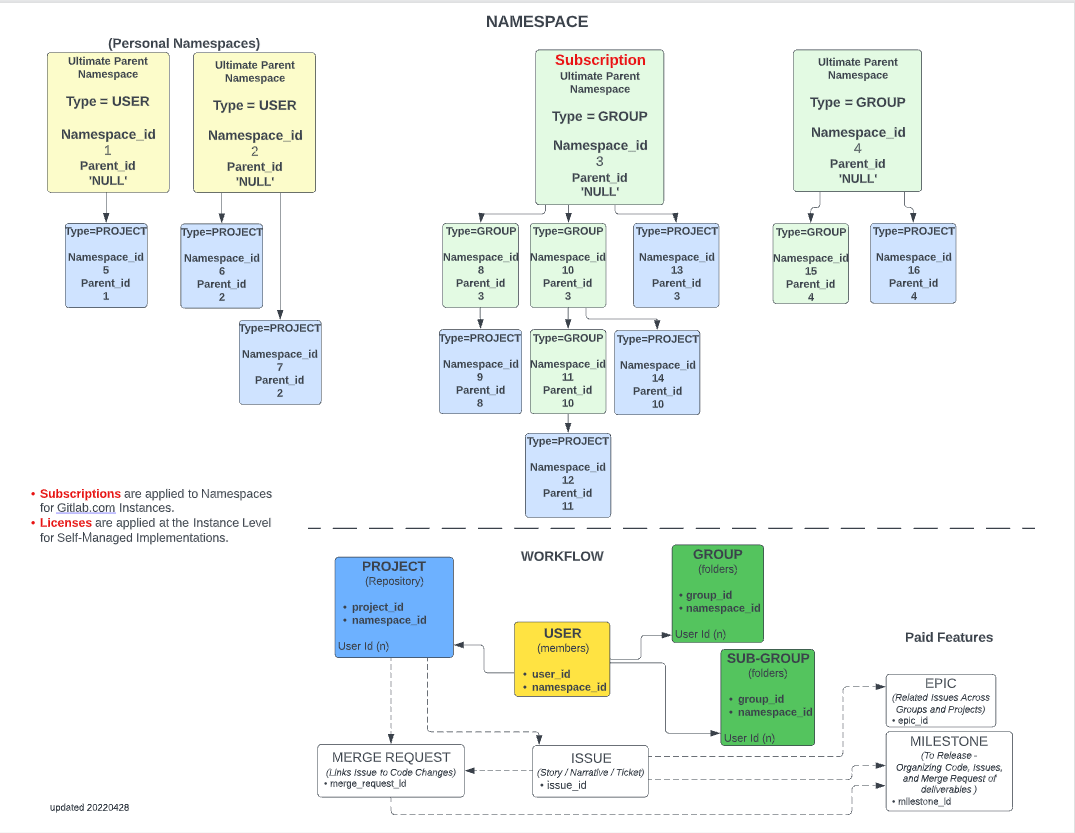
User Namespace
- Can be an Ultimate Namespace
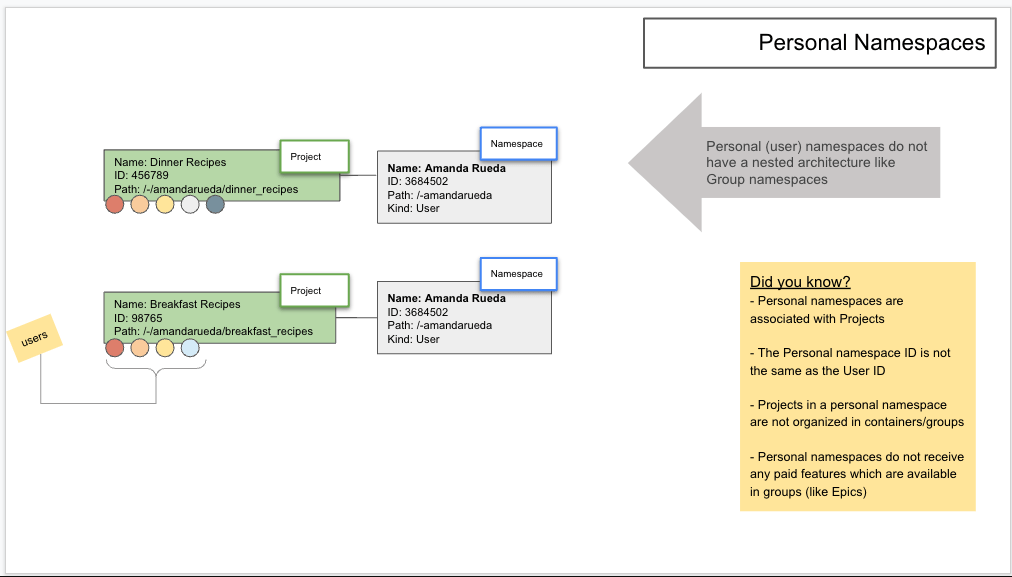
- Also referred to as Personal Namespace
- Only Projects can be created under Users
- Users are not limited to the number of Projects
- User namespaces are found in data by Namespace_Type = ‘User’
Group Namespace
- Can be an Ultimate Namespace
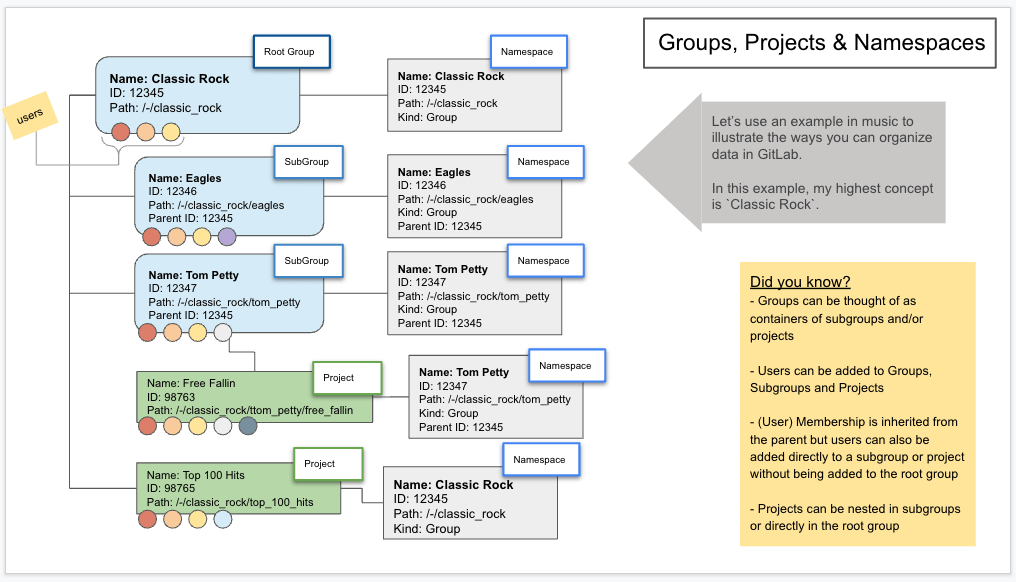
- Subgroups and Projects can be created under Groups
- Groups can be nested up to 21 levels
- Group id is the same as the Namespace Id
- The Group Data is built from the Namespace data where Namespace_Type = ‘Group’
Project Namespace
- Can NOT be an Ultimate Namespace
- Projects must have a Parent User or Group Namespace
- Projects can not have subsequent namespaces
- User namespaces are found in data by Namespace_Type = ‘Project’
Ultimate Namespace
- Top-level namespace
- Only a User or Group can be Ultimate Namespaces
- Subscriptions can only be associated with Ultimate Namespaces
- Ultimate Namespaces are found in data where:
- Namespace_is_Ultimate_Parent = ‘TRUE’
- -OR- Parent_id = ‘NULL’
- -OR- Namespace_id = Ultimate_Namespace_id
Examples
Groups, Projects & Namespaces
Personal Namespaces
Namespace Use Cases
Namespace Service Pings information is sent to Denomas showing the usage of the product by namespace. Denomas receives Service Ping information at the Instance or Namespace Ping level. The Service Ping information is used to enhance the product and better meet the needs of the users. Here are some use cases for Namespaces.
Paid, Free and Trial Namespaces Created analysis is needed to identify Namespaces that have been recently created and using Paid vs Free vs Trial (Free w/Paid Features) features of the product.
query
SELECT
    gitlab_plan_id                              ultimate_namespace_plan_id,
    gitlab_plan_title                           ultimate_namespace_plan_title,
    gitlab_plan_is_paid                         ultimate_namespace_plan_is_paid,
    COUNT(DISTINCT dim_namespace_id)            namespace_count
FROM
    prod.common.dim_namespace
WHERE
    DATEDIFF(DAY, CURRENT_TIMESTAMP, created_at) >= -90
    --AND plan_is_paid IN ('TRUE','FALSE')
GROUP BY
    gitlab_plan_id,
    gitlab_plan_title,
    gitlab_plan_is_paid
ORDER BY
    gitlab_plan_id,
    gitlab_plan_title,
    gitlab_plan_is_paid
Top-Level Group with Most Sub-Groups and Projects analysis is needed to show where the namespace is being utilized most.
query
SELECT
    TOP 10
    ultimate_parent_namespace_id                        ultimate_namespace_id,
    TO_DATE(MIN(created_at))                            min_create_date,
    COUNT(*)                                            total_count,
    SUM(CASE
            WHEN namespace_type='Group'
            THEN 1
            ELSE 0
        END
       )                                                group_count,
    SUM(CASE
            WHEN namespace_type='Project'
            THEN 1
            ELSE 0
        END
       )                                                project_count,
    SUM(CASE
            WHEN namespace_type='User'
            THEN 1
            ELSE 0
        END
       )                                                user_count
FROM
    prod.common.dim_namespace
GROUP BY
    ultimate_parent_namespace_id
ORDER BY
    group_count DESC
    --project_count DESC
    --user_count DESC
Multiple ways for Listing Ultimate Namespaces is needed to find Ultimate Namespaces
query
-- Use namespace_is_ultimate_parent when available
SELECT * FROM prod.common.dim_namespace WHERE namespace_is_ultimate_parent = 'TRUE'
-- OR Verify Namespace has no Parent
SELECT * FROM prod.common.dim_namespace WHERE parent_id IS NULL
-- OR Verify Namespace is Also the Ultimate Namespace
SELECT * FROM prod.common.dim_namespace WHERE dim_namespace_id = ultimate_parent_namespace_id
Identify Ultimate Namespaces from the Namespace table with Attributes is needed to show Ultimate Namespaces with all attributes
query
-- Join by Namespace_id
SELECT
    *
FROM
    prod.workspace_data_science.monthly_stage_usage_by_namespace            usage
    LEFT JOIN prod.common.dim_namespace                                     ns
    ON usage.dim_namespace_id = ns.dim_namespace_id
WHERE
    ns.namespace_is_ultimate_parent = 'TRUE'
Free/Trial to Paid Namespace Conversion allows mapping of namespaces to historical subscriptions and paid order records to understand the first paid subscription for a namespace. Also allows to view the MRR/ARR for first order/first paid subscription for a given namespace that helps track the revenue expansion and contraction at a namespace level.
SaaS Business Flow Diagrams
ERD Library
query
-- Trial Orders that got converted to Paid and are First Paid Orders
SELECT
    *
FROM
    prod.restricted_safe_common_mart_sales.mart_charge
WHERE
    is_trial_converted_namespace = 'TRUE'
    and is_first_paid_order = 'TRUE'
    ;
008c4f1a)
