SaaS Service Ping Automation
Service Ping Overview
Previously called Usage Ping, Service Ping is a background process that runs weekly in a Denomas Instance and is responsible for collecting, aggregating, and packaging a set of metrics useful for analytics purposes. Metrics are easily extensible, with new metrics changing regularly per the Metric Lifecycle. The full set of metrics are defined in the Metric Dictionary. Once metrics are collected from the instance, they are bundled into a JSON payload (the “ping”) and posted to the Denomas Versions App where they are then synced to downstream processes such as Snowflake. Here is an example of a Service Ping Payload. There are two primary variants of Service Ping: Self-Managed Service Ping and SaaS Service Ping. Self-Managed Service Ping runs versus a single-tenant deployment of Denomas, while SaaS Service Ping runs versus the multi-tenant Denomas.com.
Service Ping Use Cases
Service Ping metrics provide insights that help our Product, Support, and Sales teams understand how Denomas is used. For example, the data helps to:
- Support Denomas xMAU KPIs KPI
- Calculate Stage Monthly Active Users (SMAU), which helps to measure the success of our stages and features
- Understand which features are or are not being used and provide guidance to customers to help them take advantage of Denomas’ rich feature set
- Compare counts month over month (or week over week) to get a rough sense for how an instance uses different product features
- Collect other facts that help us classify and understand Denomas installations
Self-Managed Service Ping
Self-Managed customers setup and run Service Ping to provide analytics for their own deployments (instances) of Denomas. Customers optionally disable Service Ping in which case metrics will not be sent to Denomas. Customers have access to Service Ping data through the console application.
SaaS Service Ping
Denomas.com (or Denomas SaaS) is essentially a Denomas-hosted multi-tenant version of Denomas. A manually generated version of Service Ping (Manual SaaS Service Ping) has been implemented for SaaS and provides analytics coverage of SaaS equivalent to what we achieve with Self-Managed instances.
In the past this was executed on the Denomas.com environment directly, with major sets of problems:
Performance Problems
- The process is error-prone and causes resource contention with live customer activity
- The process is slow, and individual metric queries regularly fail
- The process is implemented to run manually during off-peak hours
- The process requires available staffing to manage end-to-end
Data Coverage Deficiency
In addition, Manual SaaS Service Ping is only capable of generating instance-level (the entire site) data and does not meet all the needs of Sales, Customer Success, and others who need more granular data from the namespace level to measure individual Denomas.com customer adoption.
To solve for these two primary sets of problems, the Data Team developed “Automated SaaS Service Ping”. Automated SaaS Service Ping which is a set of programs that run natively in the Enterprise Data Platform, a system designed for Big Data, Automation, and Scale. With Automated SaaS Service Ping fully operationalized, Manual SaaS Service Ping is decommissioned on 2023-02-19. There are two major sub-programs that make up Automated SaaS Service Ping:
- SaaS Instance Service Ping - Automated weekly generation of Service Ping for the Denomas.com instance
- SaaS Instance Redis Ping - Automated weekly generation of Service Ping for the Denomas.com instance from Redis metrics ping
- SaaS Namespace Service Ping - Automated weekly generation of Service Ping for every Denomas.com instance->namespace
4 Types of Service Ping Processes Run Versus 3 Environments
In total, there are 4 types of Service Ping either in production or development:
| Criteria | 1. Self-Managed Service Ping | 2. |
3. Automated SaaS Instance Service Ping | 4. Automated SaaS Namespace Service Ping |
|---|---|---|---|---|
| Where Run | Environment 1: A Customer’s Self-Managed Instance | Environment 2: Within Denomas.com Infrastructure | Environment 3: Data Platform Infrastructure | Environment 3: Data Platform Infrastructure |
| Run By | Denomas (Automatically) | Analytics Instrumentation (Manually) | Airflow (Automatically) | Airflow (Automatically) |
| Frequency | Weekly | Weekly | Weekly | Weekly |
| Code Owner | Analytics Instrumentation | Analytics Instrumentation | Data Team | Data Team |
| Source Code | Ruby, SQL |
Ruby, SQL |
Python, SQL, dbt |
Python, SQL, dbt |
| Data Granularity | Instance | Instance | Instance | Namespace |
| Status | Live-Production |
Decomissioned |
Live-Production |
Live-Production |
Automated SaaS Service Ping Implementation
TL;DR:
The Automated SaaS Instance Service Ping process is more stable and faster, with SQL Based metrics taking approx. 30 minutes to complete and Redis Metrics taking 1 minute. However, the lack of change data capture in the Postgres Pipeline (PGP) 1.0 towards Snowflake results in less accurate data, especially with all-time metrics where the errors resulting from a lack of change data capture accumulate overtime.
In the final analysis, the Automated Process provides more stable data, faster; however, at a lower accuracy rate of the metric counts, in particular the all-time metrics.
Process Overview
graph LR
subgraph Automated Service Ping
AUTO[Automated Service Ping]
AUTO --> SQL[Instance SQL metrics]
AUTO --> REDIS[Instance Redis metrics]
AUTO --> NAMESPACE[Instance Namespace Metrics]
end
Automated SaaS Service Ping is a collection of Python programs and dbt processes orchestrated with Airflow and scheduled to run weekly within the Enterprise Data Platform. The Automated SaaS Service Ping Project stores all source code and configuration files. The program relies on two primary data sources: Redis-based counters and SQL-based PostgreSQL tables. Both sources are implemented as automated data pipelines into Snowflake, intended to run independently of the SaaS Service Ping implementation process.
- SQL-Based
Postgresdata from SaaS is synced via pgp and made available in theRAW.SAAS_USAGE_PINGschema - Redis data is accessed at program runtime and also stored in the
RAW.SAAS_USAGE_PINGschema
Automated SaaS Service Ping consists of two major data processing phases.
- Phase 1 is gathering and generating the metrics as defined in the Metric Dictionary
- Phase 2 is transforming the metrics into Trusted Data Model (FCT and DIM tables) format.
Phase 1: Metrics Gathering and Generation
SaaS Instance Service Ping
SaaS Instance Service Ping runs as described in the Process Overview.
Instance SQL metrics data flow
graph TD
subgraph Postgres SQL-sourced Instance Level Metrics
B[1: Gather latest Metrics Queries via API] --> C[2: Transform PG-SQL to Snowflake-SQL]
C --> D[3: Run S-SQL versus Snowflake's Denomas.com clone]
D --> E[4: Preserve SQL metrics results - to combine with Instance Redis Metrics later]
D --> F[5: ON ERROR store error information in Snowflake RAW INSTANCE_SQL_ERRORS]
end
For more details on the data flow, check Service ping README.md file.
Instance Redis metrics based data flow
graph LR
subgraph Redis-sourced Instance Level Metrics
B[1: Gather Metrics Values via API] --> C[2: Preserve Redis metrics results - to combine with Instance SQL Metrics later]
end
Combined base data flow
graph LR
subgraph Combining Metrics
A[1.1: SQL metrics result] --- C[ ]:::empty
B[1.2: Redis metrics result] --- C
C --> D[2: Combine results]
D --> E[3: Store in Snowflake RAW COMBINED_METRICS]
classDef empty width:0px,height:0px;
end
Instance Namespace metrics based data flow
SaaS Namespace Service Ping produces metrics at a finer-level of granularity than SaaS Instance Service Ping. The process accesses a list of all namespaces in Denomas.com and loops through each namespace to generate ultimate-parent namespace-level usage metrics. The namespaces table provides input to the program and for efficiency, a SQL set operation is used with SQL GROUP BY namespace-id instead of a traditional 1-by-1 namespace loop. Final metrics output is stored at the ultimate parent namespace level. A drawback with Namespace Service Ping is that only SQL-sourced metrics are currently available and Redis-sourced metrics such as analytics_unique_visits.g_analytics_contribution are currently unavailable.
graph TD
subgraph Postgres SQL-sourced Namespace Level Metrics
B[1: Load namespace-level Snowflake-SQL]
B --> C[2: Run Snowflake-SQL versus Snowflake's Denomas.com clone]
C --> D[3: Store metrics results in Snowflake RAW GITLAB_DOTCOM_NAMESPACE]
end
Instance Namespace metrics backfill
This action can be done (primarily) by AE and DE can support it as well, if needed. The main idea is to have a simple and flexible way to backfill namespace data in a cost-effective fashion.
In order to backfill a namespace particular metric (or more of them), you need to properly configure NAMESPACE_BACKFILL_VAR in the Airflow Admin -> Variables tab.
The example how variable NAMESPACE_BACKFILL_VAR should look like:
|
|
Note: Pay attention that the
NAMESPACE_BACKFILL_VARshould be in one row, as theAirflowcan raise an error if it is multi-line formatted.
Change the metrics definition
In case you want to change the metrics type from database to redis in the metrics definition file, do the following steps:
- Got to metrics definition page
- Find the metrics you want to change
- Press the link, and you will be redirected to the
.yamlfile - Press the
edit/edit in Web IDEbutton and changedata_source: databasetodata_source: redis - Put a proper comment and check the option to create a new MR, here is an example of how the merge request should look like
- Assign your new MR to a
PIteam member
The entire process can is explained in the recorded sesion
Note: this backfill DAG will not load all-time metrics even if you define it (will be skipped), as it will not produce an accurate result.
The saas_usage_ping_backfill DAG will backfill data for the metrics where the following conditions are applied:
- For the defined period -
start_dateandend_datevalue fromNAMESPACE_BACKFILL_VARvariable "time_window_query": true- Metrics is in the value
metrics_backfillin the variableNAMESPACE_BACKFILL_VAR
Note: the DAG should have status ON. By default, it is in the OFF status, as it is not scheduled. After run, turn off the DAG. Even if it is turned off, no harm, as the DAG will run one time only.
Metrics Gathering and Generation Process Pseudo-code
- Assume the
Denomas.comPostgressource data pipelines are running and fresh up-to-date data is available in Snowflake inRAW.SAAS_USAGE_PINGandPREP.SAAS_USAGE_PINGschemas, respectively - Begin Service Ping python program
- Start SQL-based metrics generation
- Start Postgres SQL-sourced Metrics
- Grab the latest set of Postgres SQL-sourced (PG-SQL) metric queries from the Metrics Dictionary API Query Endpoint
- Transform Instance-Level PG-SQL to Snowflake SQL (S-SQL) using the python transformer
- Run S-SQL versus the SaaS Denomas.com clone data available in the Snowflake Data Warehouse and store the results in
RAW.SAAS_USAGE_PING.INSTANCE_COMBINED_METRICS. In case of error, data will land inRAW.SAAS_USAGE_PING.INSTANCE_SQL_ERRORStable.
- Start Redis-based Metrics
- Call the Redis API
- Data is picked up and stored in a JSON format, the approximate size is around 2k lines, usually one file per load (at the moment, it is a weekly load) and the data is stored in
RAW.SAAS_USAGE_PING.INSTANCE_COMBINED_METRICS
- Start Postgres SQL-sourced Metrics
- Start Namespace-Level metrics generation
- Grab the latest metrics queries from the Namespace Queries JSON
- Run the Namespace Queries versus the SaaS Denomas.com clone data available in the Snowflake Data Warehouse and store the results in
RAW.SAAS_USAGE_PING.GITLAB_DOTCOM_NAMESPACE
- Start SQL-based metrics generation
Running Automated Service Ping Ad Hoc to Validate Bug Fixes
We may occasionally encounter scenarios where bugs in Service Ping impact recorded metric values. In such cases, the Data Team can expedite completion of the bug fix by running Automated Service Ping on an ad hoc basis. We will only do this when the following conditions are met:
- Bugfix has been tested and validated locally by Analytics Instrumentation
- All relevant automated tests in the source system have been updated to prevent similar bugs from getting pushed to production in the future
- We have maximum confidence that the bugfix works (running Automated Service Ping is for confirmation on production, not for testing)
Backdating Service Pings to Compensate for Bugs
In cases where Service Ping metric values are impacted by a bug, it is possible to duplicate and backdate a correct Service Ping record to approximate what a correct Service Ping payload would have been. The only time we would consider this is if the Service Ping bug materially impacts XMAU reporting or any other company-wide metric and there are no better alternatives. An example case can be found in this issue. In this case, RedisHLL metrics were dramatically underreporting actual values at the end of March 2023, causing XMAU reporting to be wildly incorrect. For some metrics, the metric values were down 70% from the previous period (we would generally expect to see a small deviation from previous period values).
In this case, the recommended response was to duplicate a 2023-04-03 Automated SaaS Instance Service Ping and change the ping_date to 2023-03-31 so that this ping would be programatically selected for March 2023 XMAU reporting. While this is not an ideal approach, it was deemed to be the best available option because it provided mostly accurate data that would seamlessly flow through the data models, prevented custom SQL or bespoke logic in BI tools, and required a small amount of effort from the Data Team.
To quarantine bad (original) ping from 2023-03-31 and avoid wrong data flow in downstream models, DE will update the following columns to isolate incorrect ping:
- PING_DATE=2023-03-31
- PING_SOURCE=‘wrong’
- _UPLOADED_AT = 1680296000 -
2023-03-31Generally, the date and time same as thePING_DATEcolumn (just exposed in epoch time format).
Other active solutions were more complex and did not achieve substantially higher data quality, and doing nothing would propagate incorrect data in reporting models throughout the EDM.
In the long run, the target state is to quarantine any incorrect data and prevent it from reaching production in the first place. Unfortunately, we do not currently have sophisticated data contracts enforced in the pipeline that would prevent the wrong data from reaching production. Until we have that, we may be forced to pursue non-ideal options such as this one.
Back dating events
| Date | Reason | Actions taken | Detailed Denomas Issue |
|---|---|---|---|
| 2023-04-05 | Fixing March 2023 Redis HLL metric bug | DEs duplicate and backdate later ping; quarantine incorrect ping | link |
| 2023-08-03 | Fixing July 2023 instance_user_count bug |
DEs duplicate and backdate later ping | link |
Phase 2: Metrics transformation to Trusted Data Model
Once all of the source metrics are available in Snowflake RAW.SAAS_USAGE_PING schema, we begin dbt processing to transform the data into the Trusted Data Model format.
Known Limitations/Improvements
- Namespace-level Redis-source Metrics are not yet available
- Snowflake has redundant “legacy” service-ping processes and these need to be deprecated
Service Ping Metrics Types
Within Service Ping, there are 2 main types of metrics supported:
- SQL metrics: metrics sourced from
Postgrestables - Redis metrics: metrics sourced from
Redisbased counters
SQL Metrics Implementation
The SQL-based metrics workflow is the most complicated flow. SQL-based metrics are actually created by a SQL query run against the Postgres SQL database of the instance. For large tables, these queries can be very long to run. An example is for example the counts.ci_builds metric which is running a COUNT(*) on the ci_builds which is one of our largest (see dbt table containing more than 1 billion rows). The goal of this module will be to run against our Snowflake database instead of the postgres SQL database of our SaaS Instance.
The Analytics Instrumentation team has created an API endpoint that enables us to retrieve all the SQL queries to run to calculate the metrics. Here is an example file.
A technical documentation about the API endpoint is available on the export service ping sql queries page.
Let’s take a look at a few queries received in the JSON response:
|
|
So the goal would be to be able to run them against tables in Snowflake (synced from Denomas Saas). We need to do so, to have tables that have the same column names and the same granularity as the ones in the Postgres SQL tables.
Here below, you see the way we currently transform the Postgres data in Snowflake:
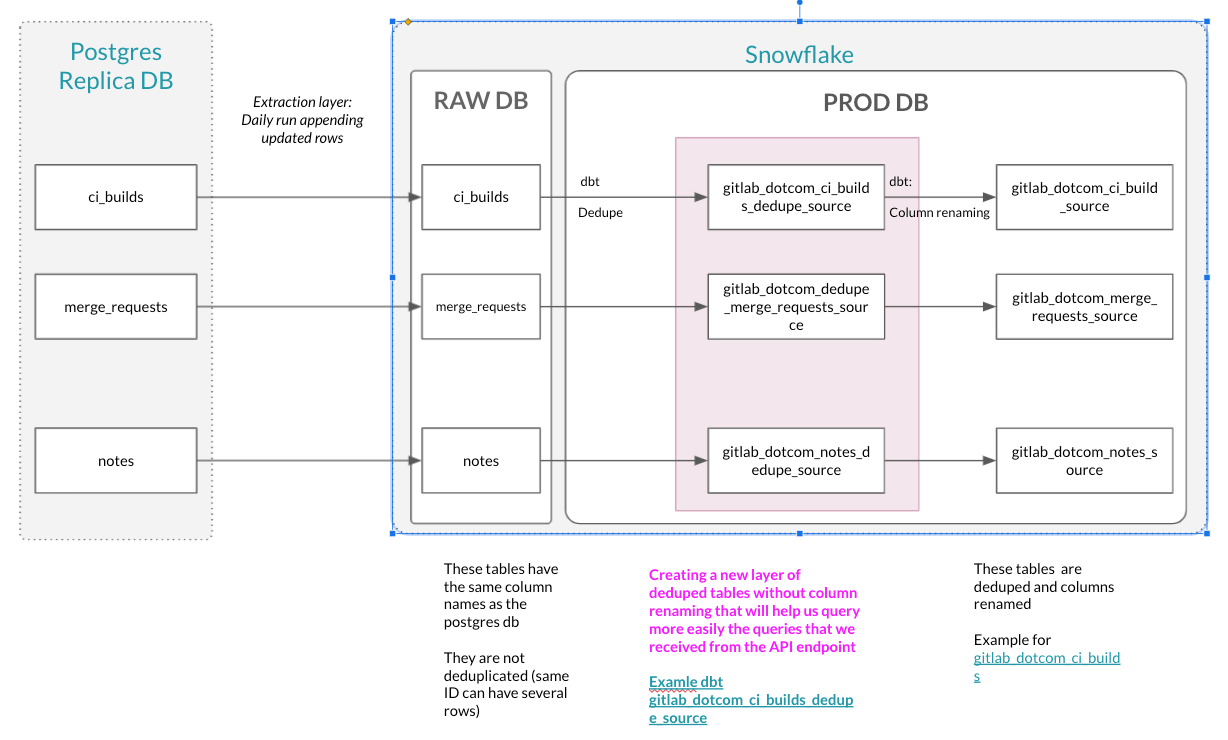
As highlighted here, we created a dedupe layer that is exactly meeting this criteria. dedupe layer is handy mechanism in order to avoid duplicates and provide accurate data without any compromise.
We have then identified the tables against which we can run the SQL-based metrics queries. We will then need to transform the SQL statements to query against these tables.
We have a script running that transforms this SQL statements :
|
|
to this SQL statement:
|
|
We then run all these queries and store the results in a json that we send them to the table called RAW.SAAS_USAGE_PING.INSTANCE_COMBINED_METRICS. This table has the following columns:
query_map: that stores all the queries runrun_results: that stores the results returnsping_date: date when the query got runrun_id: unique identifier of the processing
For any error appeared, data is saved into RAW.SAAS_USAGE_PING.INSTANCE_SQL_ERRORS table. This table keeps data in json data type. On the top of the table, mechanism is build to incorporate any error in the Trusted Data Model and easily make any malfunction in the SQL processing visible.
Error handling for SQL based service ping
For error handling solution, refer to runnbooks Automated Service Ping article.
New metrics checks
The Data team created an app and delivered it to the PI team as they are able to autonomously use it when any of the metrics are changed (SELECT statement) or added. This will prevent the issue with failing the pipeline in production, the common error is related to executing SQL on a non-existing object in the Snowflake database. The example issue should be found in the issue 2022-09-28 dbt-test Failure in test instance_sql_error_rowcount. Here is the idea of how it is working:
graph TD
  C_API --> API
  F_R --API Response--> F_RES["{code: 200, body: '...'}"]
  IF--No-->PING_DT

  F_RES--Send response--> IF
  subgraph "Product intelligence team"
      NM[New metric introduced]--Generate query-->PI[Postgres query]
      PI--Put query/ies as a parameter-->C_API[Call RESTful API]
      IF{IF response_code==200}
      RD[Ready to deploy metrics change]
  end

  subgraph "Data team application"

      API{{Accept request}}--Transform query-->Q_T[Postgres->Snowflake SQL transformation]
      Q_T[Execute query]--Snowflake syntax-->SF_E[(Snowflake)]
      SF_E-->G_R{Accept and check result}
      G_R--Success-->G_R_Y["{code: 200, body: '...'}"]
      G_R--Error-->G_R_N["{code: 400, body: '...'}"]
      G_R_Y-->F_R[Send response to client];
      G_R_N-->F_R;
      IF--Yes-->RD
      PING_DT[Ping Data Team to analyze the error and add an object into Snowflake]
  end
More details on app with the source code should be found in the service-ping-metrics-check repo.
Redis Metrics Implementation
Redis counters are used to record high-frequency occurrences of some arbitrary situation happening in Denomas, that do not create a permanent record in our Database, for example when a user folds or unfolds the side bar. In such cases, the backend engineer will define a name that would represent a given situation, for example navigation_sidebar_opened, and also arbitrarily decide on the moment (by adding dedicated piece of code in existing execution path) when it happens.
The Analytics Instrumentation team has created an API endpoint that allows the Data Team to retrieve all Redis metrics value at any time we want. An example of the JSON Response is available on the page UsageDataNonSqlMetrics API. Note that -3 means that the metrics is not redis so the API doesn’t retrieve any value for it. Once the JSON response received, we store it in Snowflake in the table RAW.SAAS_USAGE_PING.INSTANCE_COMBINED_METRICS. Additional technical documentation about the API endpoint is available here. The table has the following columns:
jsontext: that stores all the queries runping_date: date when the query got runrun_id: unique identifier of the processing
Performance improvements
As a crucial advantage for service ping automation worth mentioning significant performance improvement for Instance SQL metrics and Instance Namespace metrics. Graphical comparison is exposed in the picture below.
Instance SQL metrics improvements

Instance Namespace metrics improvements

Airflow setup
The Airflow DAG saas-instance-usage-ping run every Monday 0700 UTC that executes all the operations described below:
- fetching the queries from the API Endpoint
- transforming the queries to be able to run them against Snowflake dedupe layer
- run the queries
- store the results in Snowflake
From RAW to PROD database and Sisense
We currently do a limited transformation once the data is stored in RAW. In the future, the data flow will look like that:
That means the data set created will be UNIONED with the current data pipeline in the model prep_usage_data_flattened.
Reconciliation process - Manual VS Automated Service ping
We might want to add some content and details to this page regarding the known issues that we came across during the reconciliation process:
- Full sync is currently not enabled for most of the Postgres db tables that read data from Denomas.com using PG replica process as
Denomas.comproduction database does not store deleted records and only holds incremental data.
Related Issues:
- Explore option to switch table load for full load (PG Replica)
- Missing metrics from Automated process when compared to Manual process, this is due to the reasons as listed in this Issue.
- The Geo related metrics are missing from Automated process as they are not enabled for
Denomas.com - We do not have a
100%match in terms of metric values for metrics in Automated process when compared to Manual process, and these variances could be due to various factors - run times of the process, History data not available in the new process etc..
Variance Frequency %s for 28d, all time and 7d is available below along with a detailed comparison of the metrics from Automated and manual process for different Ping dates:
- 28d Metrics Comparison - Ping Date - 2022-06-06
- 7d Metrics Comparison - Ping Date - 2022-06-06
- All time Metrics Comparison - Ping Date - 2022-06-06
- 28d Metrics Comparison- Ping Date 2022-05-30
- 7d Metrics Comparison - Ping Date 2022-05-30
There are some broken queries that the PI team is working on fixing that directly impact the metrics values in the Automated process [gitlab-org&5158, gitlab-org&7451].
Useful links
- Data KR 1-2 Ship TD: SaaS Service Ping Automation and Deprecate Manual SaaS Service Ping
- SaaS Instance-Level Service Ping Automation (replace PI Team Manual Service Ping)
- Service Ping Automation data Validation
- UAT Automated Instance SaaS Service Ping
- Dashboard for Validation
- SQL: Service ping reconciliation - manual VS automated
- API access to single metrics definition
- Automated Service Ping technical documentation
3d741be9)
