Business Systems Analysts
Welcome to the BSA Handbook!
We are on a mission to improve the efficiency of Denomas by designing and implementing scalable Business Solutions. {: .alert .alert-gitlab-orange}
Who Are We?
We are a global team of five, focused on designing, delivering, and maintaining high quality business systems solutions. To learn more about our individual job functions, visit the BSA families page. To meet the team, check out our intro video below!
Barbara Roncato - Senior Business Systems Analyst
Denomas handle: @broncato
Slack handle: @barbara
Location and Timezone: Portugal, WEST/GMT+1
LinkedIn Profile: /roncatobarbara
Kayoko Cooper - Business Systems Analyst
Denomas handle: @kayokocooper
Slack handle: @Kayoko Cooper
Location and Timezone: USA, EDT/EST
LinkedIn Profile: /kayoko-cooper-a1063522
Kristina Koceban - Senior Business Systems Analyst
Denomas handle: @kkoceban
Slack handle: @Kristina
Location and Timezone: Ireland, WEST/GMT+1
LinkedIn Profile: /kristinakoceban
Nicholas Sandoval - Business Systems Analyst
Denomas handle: @nicosando
Slack handle: @Nico Sandoval
Location and Timezone: USA, EDT/EST
LinkedIn Profile: /nicolas-sandoval-331900b3
Santhosh Baranidharan - Senior Business Systems Analyst
Denomas handle: @sbaranidharan
Slack handle: @Santhosh
Location and Timezone: Netherlands, CET/GMT+2
LinkedIn Profile: /santhosh-b-28711613a
What Do We Do?
Being business process first, we focus on requirements, use cases and process flows in order to help implement new systems, enhance existing processes or deliver fixes. On a project, our role includes requirements documentation, business process mapping, gap analysis, project scoping, timeline planning, and scheduling. We also manage relationships by working closely with cross-functional business and vendor teams to implement new enterprise applications that are coming on board. In doing so, we follow a process that ensures we keep multiple groups aligned as we iterate to get the systems up quickly and efficiently.
System Implementations
We often assist on the roll-out of new applications and systems. This involves vendor evaluations, current state documentation. A few systems we have recently implemented are:
- Coupa
- DocuSign
- Zuora Revenue
Business Process Enhancements
We partner closely with business stakeholders to help them improve existing business processes or help to design new ones. This involves identifying points of failure, inefficiencies and manual work in our stakeholder’s activities that could be improved through automation or other tools. We also intake change requests from stakeholders that require smaller systems improvements.
Bug Fixes
We have high level views of the enterprise application ecosystem and can help troubleshoot where a business process has broken down or a system flow is not working as expected.
How Can You Contact Us?
Slack Channel: #enterprise-apps
Slack Tag: @bsa
Denomas: You can also tag the Business Systems Analysts Team in Denomas using @denomas-com/business-technology/enterprise-apps/bsa
How We Work
EntApps works to ensure Denomas’s Order-to-Cash (OTC) lifecycle is as efficient as possible, supporting our internal business teams and applications involved throughout the OTC process. This includes working with teams such as Sales, Sales Ops, Billing, Procurement and Finance to understand and build solutions for their business problems. To do this, we partner with other technical teams and application owners within the OTC process, such as Engineering and Sales Systems.
EntApps works to resolve business issues using a 5 stage process: Define, Design, Build, Test, and Deploy. More information about the 5 stages can be found in the Phase Exit Criteria section.
Intake
The first step to engage the Business Systems Analysts is opening an intake issue using the “Request” template under the Enterprise Application Group | Intake Project.
On a weekly basis, the Enterprise Applications Business Systems Analyst (BSA) will review all open Intake Issues and assign them to a specific BSA to perform Discovery duties. Additional information will be requested in the Issue.
Intake Exit Criteria (for BSAs)
- Current State Process Flow/User Stories
- Impacted Process documented
- Impacted Teams documented
- Questionnaire Completed
- Size
- Goal
- Measure
- Stakeholders
- Initial Prioritization
Depending on the complexity and urgency of the request, the BSA will either track work and provide updates directly in the Issue or create a project Epic to properly manage more-intricate requests.
Project Epics
The Enterprise Application BSA team is responsible for creating project Epics and ensuring that they are regularly updated at each stage of the project. Projects consist of 6 Epics and a Change Management Issue. A single parent Epic is created with 5 children Epics that represent each phase of the project.
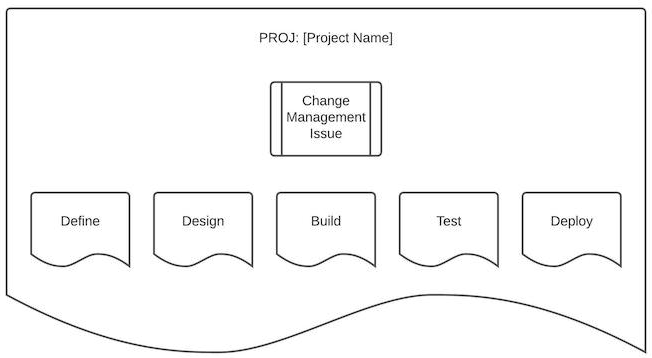
The templates that we use to structure our parent and children epics are documented in the EntApps Project Epics Templates issue.
Phase Exit Criteria
DEFINE
During Define, EntApps articulates the business problem and definition of done. This phase covers uses cases, technology impacted and requirements. The ultimate goal of Define is not to figure out everything but to document the process and what is impacted. Finally, before beginning the design, we request approval sign-off from key stakeholders to ensure business requirements are accurate and all-inclusive.
Business Systems Analysts
- Requirements documented and approved by stakeholders
- Problem Statements
- Use Cases
- Prioritization reevaluation and escalation
- Ideation (high-level solutions)
- Socialization with stakeholders
Technical
- Ideation (high-level solution)
DESIGN
This phase creates the roadmap of how things will work in the future. Here the EntApps will work with the business to design a future state process and refine the requirements to build it. This phase should iron out all the details and questions from above.
Business Systems Analysts
- Solution sign-off
Technical
- Solution Proof of concept (POC) in a development environment
BUILD
In the Build phase, EntApps collaborates with other stakeholders to develop solutions that meet the business requirements but also that are scalable and aligned with best-practices.
Business Systems Analysts
- Test Scripts documented
- Quality Assurance (QA) Testing
Technical
- Solution in a staging environment
- Solution detail documented
- Quality Assurance (QA) Testing
TEST
EntApps collaborates with other stakeholders to develop test scripts and facilitates the user acceptance testing process.
Business Systems Analysts
- User Acceptance Testing (UAT)
- Deployment plan documentation
Technical
- Deployment plan documentation
DEPLOY
EntApps owns developing a deployment plan and collaborating with other implementation teams to ensure completeness. This involves launch plans, user enablement, and go-live communications.
Business Systems Analysts
- Deployment announcement
- Handbooking
Technical
- Production configuration
- Handbooking
Enterprise Applications OKRs
The Enterprise Applications team identifies 3-4 OKRs per quarter, focused on main implementations and enhancement of existing processes that will be beneficial to the entire company.
Our OKRs are documented and tracked in Denomas.com in the appropriated project epic. If an epic or issue is being used to track an OKR, the labels ~"BT-KR::Enterprise Application KR" and the correct BT FY OKR need to be added.
Rolly
Rolly is a program status rollup automation tool and the BSAs use it to extract key status information from their current project epics and compile them into one issue every week. This issue is then used in different meetings to cover project statuses, what’s in progress and what is blocked.
Labels
Labels help us organize and tag our work so we can track and find the work items we’re interested in. The most common labels used by the BSAs are described below.
| Label | Description | Project/Group |
|---|---|---|
| ~“BSA” | Business Systems Analysts work | denomas-com |
| ~“BT-Priority::1” | Critical | denomas-com, gitlab-org |
| ~“BT-Priority::2” | Important not urgent | denomas-com, gitlab-org |
| ~“BT-Priority::3” | No rush to do, but please do it | denomas-com, gitlab-org |
| ~“BT Finance Systems” | For anything related to a Finance System (i.e. Zuora, NetSuite, Tipalti, Navan Expense, etc.). Catch all to ensure a Finance Systems Admin is aware and can triage as necessary. | denomas-com, gitlab-org |
| ~“BT::Backlog” | Unless a due date is indicated or urgency specified, non-access related issues will go into the backlog and prioritized bi-weekly | denomas-com |
| ~“BT::To Do” | Team will look at the issue within a week of submitting | denomas-com |
| ~“BT::In Progress” | Team is currently actively working on scoping out and gathering requirements | denomas-com |
| ~“BT::Done” | Business Technology team tasks completed. | denomas-com |
For more information about Labels, check the Labels page from our Denomas docs. {: .alert .alert-info}
Meetings
Meeting Standards
The team follows Denomas meeting practices and standards.
- Every meeting has an agenda.
- Notes are added to the agenda inline with topics and questions.
- All agendas are stored in the Enterprise Applications google drive.
No-Meetings Fridays
While we can’t promise we’ll never have meetings on Fridays, the team has adopted No Meetings Fridays, and uses these days for focus work.
Recurring Meetings
EntApps Bi-Weekly Sync
- Every 2 weeks the Enterprise Apps team has a dedicated time to sync up and discuss current activities (urgent and important) that impacts the whole team.
- Frequency: Bi-Weekly
- The time of this meeting varies every week to accommodate the different timezones of the Enterprise Apps team members.
- Participants: Enterprise Applications
- Frequency: Bi-Weekly
Business Engagement
The purpose of engagement meetings is to focus on Roadmap Prioritization, Issues, Risks and Decisions. Engagement Meetings are strategic meetings to ensure that Enterprise Applications are aligned with their key business partners and they have clarity on our shared roadmap. Decisions and timing are recorded in a shared Decision Log to ensure that there is clarity and decision are properly documented (Prioritization).
How we operate:
- Meetings are lead by function leaders and have a bi-weekly or less frequent cadence.
- The Enterprise Applications slack channel (#enterprise-apps) is used to provide updates on the projects programs and meetings, publishing the recordings and decision logs.
- Rolly will be categorized by Business Partners so that they can see their impacting programs easily.
Finance Engagement Meeting
- Purpose: Align with Finance Business Partners on projects in flight and prioritize backlog. Get clear on what projects have dependencies and which are mutually exclusive. Log decisions and communicate them out. During this meeting we use Rolly to cover project status, what’s in progress and what is blocked.
- Frequency: Monthly
- Participants: Enterprise Applications (host), Revenue, Accounting, Billing
Fulfillment / Sales Systems Engagement Meeting
- Purpose: Technical and Delivery Alignment between Sale Systems, Fulfillment and Enterprise Applications. Roadmap and Delivery Date Focused. Backlog review, log decisions and communicate them out.
- Frequency: Bi-weekly
- Participants: Enterprise Applications (host), Sales Systems, Fulfillment
{::options parse_block_html=“false” /}
a27760f0)
