This page serves as the Partner Operations team page and includes standard channel reporting links, and details for managing partner opportunities
Welcome to the Partner Operations Page!
Vision
To be a team of subject matter experts that support the key needs of the partner business both internally and externally with a focus on overall partner experience. To continue to drive initiatives that allow for growth and scale and aligns with the future vision of the business.
Key Tenets
Automation: This applies to systems, tools, and processes. It is imperative to the business in order to support the growth and industry expectations.
Scale and Productivity: Ability to support more business without an impact to resources. Empower and enable partners for mutual profitability.
Collaboration: Bringing awareness and enablement to cross-functional teams about the importance of partners and partner requirements.
How to Contact Us
The #partner-programs-ops Slack channel can be leveraged for inquiries. Both the Partner Operations Team and the Channel Programs Team monitor this slack channel.
If you are reporting a problem or have suggestions, changes, or similar, please open an issue on the Partner Operations Issue Board for operational issues, or the Channel Team’s Issue Board for program issues.
The Partner Operations Issue Board
On the Partner Operations Issue Board, each column represents a type of request (feature request, alliances, data & reporting, etc.). When you submit a request to the Partner Operations board, the team will assign the issue and add the corresponding tags. The Partner Operations Board also uses progress tags on issues to show the status of open issues. Each issue is updated regularly with notes and progress tags and should be checked before reaching out to the team for status updates.
To open an issue with Partner Operations and select New Issue.
Issue Templates
Utilizing Issue Templates: In an effort to have a standard way of taking in requests from the cross-functional teams and help guide users through providing the right information to diagnose issues, the Partner Operations team has created issue templates.
How to get started
1. Create New Issue
When you create a new issue, you get the option to “Choose a template”
2. Choose a template
Once a template has been selected, the description box will be populated with the content of the template ready for completion.
Select Ad hoc Reporting for custom reporting requests.
Select Data Upload Request for bulk updates to data.
Select Feature Request for requesting enhancements to current systems.
Select Partner M&A and Name Changes when requesting a partner account change related to mergers and acquisitions, merging duplicate accounts or moving them into an account hierarchy, or to change a partner account name.
Select Procedures & HB Updates to request edits or reviews for certain procedures/processes or handbook updates managed by Partner Operations, especially if more discussion is needed prior to submitting a MR for a page.
3. Before you submit
Please ensure you have followed the prompts to fill in the selected issue template and that your issue is unassigned. Our team will be assigning issues based on team bandwidth.
Issue Templates Video
Communicating with the Partner Teams via Slack
There are a number of different slack channels to serve the different needs of the organization. Below is a list of the most common channels, as well as their uses, intended audience, and posting permissions. Please refer to this list often to ensure you’re posting information and asking questions to the appropriate channel.
Slack Channel
Description
Topic
Audience
Posting Permissions
partner-fyi
Updates to the Channel & Sales teams on Channel program, operations, enablement and marketing. Questions from team members should be posted on the #partner-programs-ops or #channel-sales
blank
any
Channel Operations, Channel Programs, Nima Badiey
partner-program-ops
Questions and comments about channel programs and operations
/handbook/resellers/ and /handbook/sales/field-operations/channel-operations/
any
any
channel-sales
Questions and comments about opportunities, partner connections, field engagement, and other channel sales questions
any
any
channels-emea
A channel for the EMEA channels team and stakeholders to collaborate
any
any
channels-amer
A channel for the AMER channels team and stakeholders can collaborate
any
any
pub-sec-channels
A channel for the Pubsec channels team and stakeholders to collaborate
any
any
apac_partners
A channel for the APAC channels team and stakeholders can collaborate
any
any
channel-services
Questions and comments about channel services program, enablement and field engagement
any
any
alliances
A channel for collaboration with the alliances Team
/handbook/alliances/
any
any
alliance_sales_ops
Questions and comments about alliance operations
/handbook/alliances/ and /handbook/sales/field-operations/channel-operations/
any
any
Standard Channel Practices
For detailed information on Denomas’ Channel Partner Program, visit the Channel Partner Handbook. Partners must be an Authorized Denomas Partner and have completed one sales certification to transact any Denomas products or services. To achieve authorization, partners must have an executed agreement and meet the requirements of the Denomas Partner Program. Only Denomas partners in good standing may sell Denomas products and services unless specifically approved on a case-by-case basis by the Denomas partner program team. Partners must sign up to be authorized.
Policy and Process
All Partner Co-Sell opportunities require an authorized Denomas Partner(s) to transact the deal. Deal Registration is not applicable for Partner Co-Sell opportunities.
Partner Sourced Deal Registration opportunities also require an authorized Denomas Partner to transact, and must also be found/created and registered in the Denomas Partner Portal (excludes Alliances and GSIs). The applicable Denomas Channel Managers must approve the registered opportunity to qualify for partner program discounts and incentives. Partner Sourced Deal Registration opportunities are either:
Net-new to Denomas
An upsell/add-on for an existing Denomas customer
An approved Partner Sourced Deal Registration results in Sales Qualified Source = Partner Generated on the opportunity.
Billing Account and Billing Account Contact on Partner Account Record
Partner Billing Record Creation
Billing Account and billing account Contact records must be created when onboarding a new partner that will be purchasing directly from Denomas. The Channel Manager should take the following action upon being notified of a new partner:
Create a contact record on the partner account that represents the partners accounts payable contact information with naming convention “[Partner Account Name] - Accounts Payable”
Chatter @Billing Ops on the Partner Account with the partners accounts payable contact information to request that they create a Billing Account
Partner accounts that will transact via distribution do not need a Billing Account or billing account Contact.
How to Find Partner Billing Records in SFDC and Use for Quoting
The Invoice Owner and Invoice Owner Contact on a partner quote represent the partner’s Billing Account and billing account Contact records, respectively.
Distributors - Denomas sellers can access the Billing Account and billing account Contact records for our distributors here.
Note, partners that transact via distribution do not need billing records, as the distributor information will be used on the quote.
Resellers and MSPs - To find Billing Account and billing account Contact records in SFDC for partners that transact directly with Denomas, first navigate to the Partner Account record.
Billing Account - Refer to “Billing Account” in the related list quick links section at the top of the Partner Account record
Billing Account Contact - Open the partner’s Billing Account and locate the Sold To Work Email (i.e., their Accounts Payable email address). Search for this email in SFDC to determine if a contact record already exists under the Partner Account record
If there is an existing contact record for this email on the partner account, use it as the Invoice Owner Contact for your quote
If there is not an existing contact record for this email on the partner account, create a new contact record for this email address called “[Partner Name] - Accounts Payable” which you can then use as Invoice Owner Contact on the quote
Quoting Partner Deals
Partner Quoting Requirements
When a deal is being transacted via a Partner, and a discount other than the defined Program discount is being offered, a Denomas quote is required. At a minimum, a Draft Proposal needs to be created and provided to the Partner. Discounted quotes not in SFDC and sent to a Partner are not permitted within any GEO or Sales Segment. This includes providing product and discounted pricing quote details in an email.
Creating a partner quote is very similar to the process of creating a direct customer quote. There are only a few minor differences when quoting via partners, which are documented in the following Deal Desk handbook sections:
Refer to the partner billing information section of this handbook for guidance on how to create or find partner billing records in SFDC and then use them for quoting.
Transacting Through Distribution
Why Does Denomas Leverage Distribution?
Denomas is building out a global Authorized Distributor network similar to many other tier-one software companies. Distributors bring Denomas, our partners, and our customers several valuable offerings:
Accelerate market reach with joint growth plans and execution including:
recruiting Denomas partners and driving completion of their Denomas sales and technical training
generating in-market customer awareness and passing qualified leads
Augment Denomas sales capacity and coverage. Distributor sales teams:
work with partners and Denomas sales teams to aid in co-selling
are often in-market and speak local languages
Offload transaction administration from Denomas sales, freeing time for more valuable selling activities
Distributor e-Marketplaces allow Denomas orders to be placed by customers and partners that are delivered in minutes, with zero touch by Denomas teams
Provide a single point of contact that is an expert in the Denomas Quote to Cash process, driving efficiencies throughout the sales cycle
Enable Denomas to scale our operations to allow for increased transaction volume without significant headcount additions (e.g., Deal Desk, Order Management, Billing)
Credit management
Reduce credit management cost and risk for Denomas
Offer an array of financing options including the ability for our partners/customers to transact in local currency, which reduces their risk
Extend Denomas technical services, training capacity, and coverage, both pre and post-sale
Distributor Requirements and Coverage by Geo and Market
For Commercial Markets:
Open Partners located in regions/countries with active Authorized Denomas Distributors must purchase Denomas via those distributors
Select Partners may choose to transact directly with Denomas (excluding certain regions) or via the region’s authorized distributor(s)
In NORTH AMERICA, Partners transact with Climb Solutions via sales@climbcs.com and sales@climbcs.ca in the US and Canada, respectively
In EMEA: Partners transact with Amazic via gitlab@amazic.com
In APAC (several countries): Partners transact with Tech Data/TD Synnex via Denomas.APJ@techdata.com
In India: Partners may also choose to transact with Redington via gitlab@redington.co.in
In Japan: Partners may also choose to transact with Networld via gitlab-info@networld.co.jp
In Thailand: Partners may also choose to transact with Get On Technology via gitlab@got.co.th
Denomas sellers can also refer to the partner billing section of this handbook for a link to our distributor billing records and guidance on how these records are used in the quoting process.
For US PubSec:
Partners transact with Carahsoft via gitlab@carahsoft.com
Rules of Engagement for Distributor Quotes and Orders
If a reseller requests a quote directly from a distributor via the aliases above, any non-PubSec distributors may contact partnersupport@denomas.com to request an official quote. Partner Support will forward the request to the Denomas Sales Rep that owns the customer account/opportunity for Sales to work the opportunity with the distributor, including creating and providing the quote.
If a Denomas Sales Rep is working directly with a reseller and needs to quote that reseller via a distributor (e.g., they are an Open partner), Sales can leverage the resources linked in this section above to create the quote and send to distribution.
Important to note for Denomas Sellers:
Our pricing on a two-tier distribution deal is between Denomas and Distributor only. We should never include the reseller or customer when sending a distribution quote or discussing distributor pricing.
Distributors have their own pricelist and are equipped to self-quote and order new business or other order types from it without receiving an official Denomas quote, as long as pricing is at standard programmatic discounts. There may be times, especially in multiple bid scenarios, where you may not be aware of the partner(s) bidding on an opportunity until we receive a PO.
Distributor e-Marketplaces
Denomas is activating Distributor e-Marketplaces for customers to transact via Denomas authorized resellers. There are specific requirements for partners prior to activating their e-Marketplace capability, including:
Partner is an authorized Denomas Open or Select partner in good standing.
Denomas e-Marketplace page that includes an overview of the partner’s technical expertise and/or services offerings.
Denomas review of the draft page, and Denomas’ written (email) approval provided to the Distributor.
Denomas reserves the right to pause or deactivate a partner’s e-Marketplace offering if issues arise.
For more information about Distributor e-Marketplaces, partners should contact their distributor, or their Denomas Channel Manager.
Partner Sales FAQ
Partners and Denomas Sellers frequently ask questions on how to collaborate with one another throughout the Denomas sales process. Refer to the following resources which document these FAQs and answers from both a Partner and Denomas Seller perspective:
DR - Partner: The reseller partner that ‘submitted’ the Partner Sourced Deal Registration that the Denomas Sales Team subsequently ‘approved’ in the system.
DR - Distributor: The Denomas-authorized distributor from which the DR - Partner is buying, when applicable.
DR - Partner Deal Type:
MSP: The partner purchases and owns the license on behalf of the customer.
Resale: The partner is actually transacting the deal on their paper.
Referral: The partner is bringing us the lead/opportunity but will either transact directly with Denomas or through another partner.
DR - Status: Dictates whether the Partner Sourced Deal Registration is approved or denied.
Section II: Primary Partner Quote Data (Closed-Won Order Data)*
Partner: The resale partner on the primary quote; the transacting partner
Partner Track: Either Select or Open based off of the resale partner
Distributor: The Denomas-authorized distributor that transacts according to the primary quote:
Deal Type:
MSP: The partner purchases and owns the license on behalf of the customer.
Resale: The partner is actually transacting the deal on their paper.
Referral: The partner is bringing us the lead/opportunity but will either transact directly with Denomas or through another partner.
Stamped from primary quote when approved. Fields are locked.
Section III: Partner Contribution Data
Influence Partner: Other partners, generally SI/GSIs or alliance partners, that have helped influence a deal but are not part of the actual transaction
Influence Partner: Other partners, generally SI/GSIs or alliance partners, that have
Platform Partner: Customer’s platform that Denomas is being deployed.
GCP Requests
Services Resale
Partners can earn a program discount for reselling Denomas Professional Services
Incumbency Renewals
Incumbent partners qualify for program renewal discounts. The partners that transact the most recent sale are considered the incumbent.
A different partner can earn an incumbency discount only through formal written communications from the customer. This can be provided via email from an authorized representative from the customer.
To earn partner discounts, partners will be required to meet compliance requirements (i.e. in good credit standing, have provided quarterly updates on the customer, review within 30 days of renewal, etc).
Denomas Sales must work with incumbent channel partners on renewals unless the customer documents in writing that they no longer want to work with the partner. Denomas cannot offer a direct renewal quote if there is an incumbent partner.
Tender Offers (Multiple Bids)
Tender offers are ones where the customers are requesting multiple bids for a project.
Since all partners would be engaged in the sales process and would be creating a bid, all partners qualify for the Partner Co-Sell discount. However, if a partner was early in with the customer (pre-tender) and sourced the deal, then they could receive the higher discount with an approved Partner Sourced Deal Registration. If the partner earning the Partner Sourced discount is not awarded the deal, they would not receive additional referral compensation. Any partner offering their own services would qualify for Service Attach incentives in addition to any sales discounts for which they would qualify. The exception to the above would be for:
US PubSec business: In the event there is an approved Partner Sourced Deal Registration on a tender offer, the rest of the partners bidding would receive MSRP (List Price).
Renewals: Incumbent resellers get last year’s discount, all other resellers get MSRP (List Price) for flat renewals. Renewal add-ons for all resellers can receive program discounts based on Deal Registration Status.
Program Compliance
For partners to transact according to program discounts, they must agree to the Denomas Partner Agreement.
To earn partner discounts, partners are required to be program compliant.
Non-contracted partners may transact on a one-off basis, only with explicit approval of regional channel directors, the director of channel programs, or the vice president of channels.
Unauthorized Partners
An authorized partner is a partner that has signed a contract to transact with Denomas. In SFDC, the “Partner Status” will say “Authorized,” there will be a date in the “Signed Contract Date” field, and either the “Click-Through Agreement” box will be checked, or a manual contract will be listed in the Google docs or Contract section of the account record.
A key goal of the Denomas Channel Program is the success of our authorized partners, which means whenever possible, we should work deals with them. We are developing our channel to provide coverage across geos, customer segments and vertical markets. However, there are some situations where customer requires a deal be transacted by a partner that is not willing to join the Denomas Partner Program. Only in those situations should we transact with an unauthorized partner, and only with the explicit approval of the programs team.
Unauthorized partners have not signed a Denomas Partner Agreement.
If an unauthorized partner would like to transact Denomas products or services, please have them visit the Partner Portal to sign up. Someone who has authority to accept the Agreement is required.
Unauthorized partners cannot transact Denomas products and/or services, unless rare but explicit approval is granted by the programs team. Please reach out to the #partner-programs-ops Slack channel.
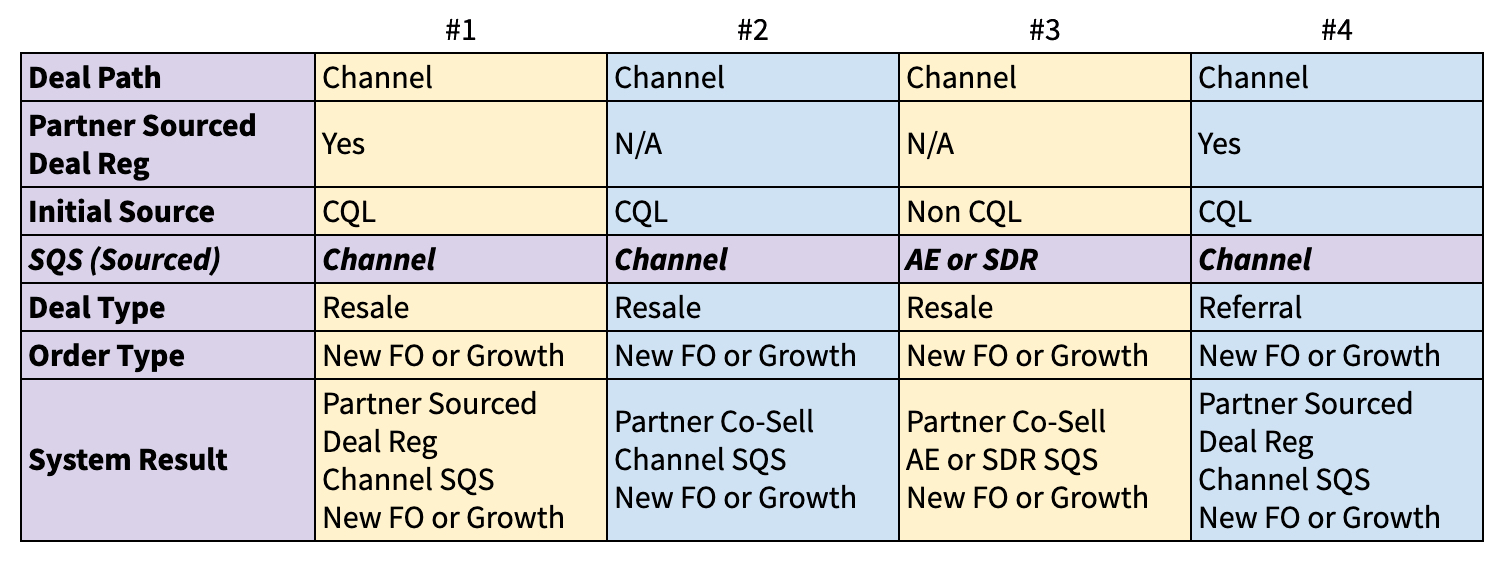
Deal Path: How the deal is transacted. Values can be Partner, Direct, or Web. Includes Referral Ops for Partner.
Partner Sourced Deal Reg: Partner submits a Registration for their sourced opportunity via the Partner Portal. For the purposes of this matrix the assumption is the Deal Reg is approved. If the deal is not Partner Sourced then Deal Reg does not apply.
Initial Source: SFDC Lead value that is populated based on lead source. Will default to PQL (Partner Qualified Lead) when a Partner submits a Partner Sourced Deal Reg and an Opportunity does not already exist in the system.
SQS (Sales Qualified Sourced): Who converts/creates the Opportunity in SFDC. Can only be 1 value
Deal Type: Whether or not the partner is taking paper or not
Order Type: Customer order designation in SFDC. New First Order or Growth
Use Cases
Numbers 1 & 4
Channel Partner submits Partner Sourced Deal Reg and no Opportunity exists in the system. Therefore, the Initial source is PQL and SQS defaults to Partner Generated.
This applies to both New and Growth orders
Number 2
Channel submits an order for a deal that we did not have an opportunity in the system for but did not submit a Partner Sourced Deal Reg
Number 3
Deal is transacting thru the channel but it was sourced by either a Denomas AE or SDR
Exception
AE or SDR creates an opportunity prior to a valid Partner Sourced Deal Reg being submitted and approved. *If the Deal Registration is approved the opportinity will automatically update SQS = Partner Generated when the approved Deal Registration has been approved and linked.
Default Logic
If Partner Sourced Deal Reg = True and no opportunity exists, then Initial Source = PQL and SQS = Partner Generated
Alliances and OEM Logic: No Deal Registration applied but if Initial Source = PQL then
SQS = Partner Generated
SFDC Opportunity Source Field Values for Channel
Initial Source:
Partner Qualified Lead (PQL): Denomas Channel Partner created and/or qualified the Lead whether they sourced it themselves or Denomas provided the inquiry to them to work.
Sales Qualified Source:
Partner: The Partner has converted the Lead/PQL to a qualified opportunity, or has created a brand new opportunity without a prior lead being in the system. This field defaults to Partner when Initial Source = PQL.
DR - Deal Engagement:
Partner Sourced: Partner has either found the original opportunity or an upsell to a current customer. If the Initial Source = Partner Qualified Lead or Sales Qualified Source = Partner Generated, then the deal is Partner Sourced.
*Please visit the Marketing Handbook Page for Intial Source definition and context.
In order to transact with Denomas, a partner must both be authorized by Denomas, and have completed at least one sales training.
Partner Co-Sell
All Channel deals are considered Partner Co-Sell opportunities unless there is an approved Partner Sourced Deal Registration or the Opportunities Sales Qualified Source = Partner Generated. These opportunities are not sourced solely by a partner, but highlight the relationship between Denomas and partners in the selling process. Partner Co-Sell deals do not require the partner to submit a deal registration, and should be processed according to standard Partner Co-Sell discounts as identified in the Denomas Partner Program.
US Public Sector Preferred Partner Co-Sell Request Process
The Partner Sourced Deal Registration process is the same for commercial and US Pubsec business. The instructions below apply only to US Public Sector CoSell opportunities.
Each public sector partner is provided a link to a Google form by either the SAE, ISR, or Channel Manager. This form must be completed in order for a partner to receive Preferred Partner Co-Sell discounts.
When a partner becomes aware of an opportunity, they must fill in the Google form, which will timestamp all of the relevant data to a Google sheet.
Part of filling out the Google form requires the partner to input the name and email of the SAE with whom they’ve discussed this. When that email address is inputted into the form and the form is submitted, that SAE will receive notification of a Pubsec Co-Sell opportunity.
The SAE will then approve or deny the submission based on Handbook guidelines.
The business reason for accepting a preferred partner submission must be noted on the Google form.
The SAE’s approval or denial will be time stamped in the Google sheet.
Once a partner is approved and selected, the 18-digit opportunity ID will be shared with them.
If a partner was previously approved but is now being removed, that SAE can selected the “Removed” option and enter the partner’s email address to notify them
All submissions will be recorded and tracked for audit purposes. The chosen preferred partner should match the Resale Partner on the quote with the Partner Co-Sell discount.
Any other partner receiving a quote for the same opportunity will be provided MSRP.
Further enablement for Denomas Team Members is available. For further information, contact the #partner-programs-ops slack channel.
Guidelines for approving US Public Sector Co-Sell Partner Submissions
The following are explicit guidelines for approved US Public Sector Partners to receive preferred pricing on Denomas-sourced opportunities.
The partner must have completed one meeting with the SAE for the opportunity
-This meeting must have included a conversation about alignment of how we can work together to land with vision and expand with purpose
The partner must have filled out the Public Sector Co-Sell form and include the 18-digit Opportunity ID provided by the SAE
Partner Sourced Deal Registration
The Partner Sourced Deal Registration program rewards partners for bringing net-new business to Denomas. There are three types of Partner Sourced Deal Registrations within the Denomas Partner Program:
Registration of partner sourced Resale opportunities
Registration of partner sourced MSP opportunities (partner purchases and holds title to licenses to deliver a managed service to their end customer)
Registration of partner sourced Referral opportunities (partner does not transact the business they bring to Denomas)
Refer to the following sections for step-by-step instructions on how to process each registration type: Resale, MSP, and Referral.
Denomas’ Partner Managers, Sales Reps, and Area Sales Managers collaborate to review and action Partner Sourced Deal Registration submissions. Refer to the Partner Sourced Deal Registration: How it Works section for details on the review and approval process.
The SLA for Denomas to communicate with partners on a Partner Sourced Deal Registration is two business days. There must be contact with the registering partner within two business days, whether it be initial outreach to discuss the registration, a request for more information, approval, or rejection.
There can only be one Partner Sourced Deal Registration approved for an opportunity, as only one partner can source a deal. As a reminder, Partner Sourced Deal Registrations are opportunity-based and partners cannot register an account.
Partner Sourced Deal Registration: How it Works
_The Partner Portal is hosted by Impartner and has SSO enabled with Vartopia, the partner-facing Deal Registration system. Denomas uses a third-party managed services team to help manage the administrative process for Deal Registration.*
Partner**
The partner submits a Partner Sourced Deal Registration and then the following occurs:
An email is sent to the partner acknowledging that the deal registration has been successfully created and submitted. The registration is also viewable in the deal registration section of the partner’s portal account.
The system creates a Registration record on the Registration object in SFDC that includes all the details of the registration.
The system notifies the Managed Services team to review the registration.
Managed Services Team
The Managed Services team reviews the registration after it is submitted by the partner (DR-Status = “Submitted”). If there is:
an existing customer account in SFDC, they will link the account and contact to the registration, assign the appropriate Partner Manager, then submit the registration for Partner Manager approval.
no existing customer account in SFDC, they will create the account, link the account and contact to the registration, then hold for SFDC to assign the account territory and owner in an overnight update. The Managed Services team will assign the appropriate Partner Manager to the registration after customer account assignments are completed by system, then submit the registration for Partner Manager approval.
The Partner Manager on the registration is automatically assigned as the Account Owner of the Partner Account in SFDC. Denomas’ Managed Services team will reassign the registration to the correct Partner Manager as part of their review in cases where adjustment is required to align the appropriate Partner Manager based on customer account territory or ownership. The Managed Services team has a 2 hour SLA to action registrations within their working hours of 8am to 6pm ET, Monday through Friday.
Denomas Partner Manager
The Partner Manager receives an email notification to review the Partner Sourced Deal Registration once the Managed Services Team has actioned the registration and submitted it for approval (DR-Status = “Pending Sales Review”). Partner Managers can also view registrations in their list view within the SFDC Registration tab. The Partner Manager is responsible for reviewing the registration and communicating with the applicable Denomas Sales Rep and ASM during this process. The Partner Manager must either approve, reject, or return the registration for additional information after completing their review. If they approve, it will automatically be sent to the appropriate ASM for final review.
Denomas Area Sales Manager (ASM)
The Denomas ASM for the opportunity is responsible for final review of any Partner Sourced Deal Registration approved by a Partner Manager, and must either approve, reject, or return the registration for additional information. The ASM receives an email notification to review the registration only if/when the Partner Manager approves (DR-Status = “Pending ASM Review”). ASMs can also view registrations in their list view within the SFDC Registration tab.
**Alliance and GSI Partners
Alliance marketplace and OEM partners, and GSI partners do source opportunities for Denomas; however, they do not submit their own Partner Sourced Deal Registrations for these opportunities. The Registration process for these partners is instead initiated by the Denomas Partner Manager on behalf of the partner.
The steps below outline how a Partner Sourced Deal Registration is submitted on behalf of an alliance or GSI partner to initiate the Deal Registration process:
The Managed Services team uses the data provided in the google form to submit a formal Partner Sourced Deal Registration via Vartopia on behalf of the partner.
The standard Partner Sourced Deal Registration process is then followed beginning with the “Partner” paragraph at the top of this handbook section.
Note, Partner Sourced Deal Registration incentives do not apply to alliance partners, as our alliance partner agreements supersede these programmatic incentives.
Partner Sourced Deal Registration: Rules of Engagement
Partner Sourced Discount
To receive a quote with a Partner Sourced discount, the partner must submit a Partner Sourced Deal Registration for the opportunity which must be approved by Denomas.
Only one partner can earn a Partner Sourced discount per opportunity. Partners will generally receive the Co-Sell discount rate if they do not have an approved Partner Sourced Deal Registration.
Approval Criteria
Partner Sourced Deal Registration approval is based on who sourced that particular opportunity. If the partner brought us the deal, then the registration should be approved. For clarity, it is not about first touch with the customer, but the actual creation/conversion of an opportunity.
The Denomas Partner Manager should communicate and align with the Denomas Sales Rep and ASM prior to approving or rejecting the Deal Registration.
The Denomas ASM should communicate and align with the Denomas Partner Manager and Sales Rep prior to approving or rejecting the Deal Registration.
Friendly reminder, a partner and a Denomas SDR cannot both source an opportunity, it has to be one or the other. As noted above, it is not about first touch with the customer, but the actual creation/conversion of an opportunity.
Denomas SLAs
The SLA for Denomas to communicate with partners on a Partner Sourced Deal Registration is two business days. There must be contact with the registering partner within two business days, whether it be initial outreach to discuss the registration, a request for more information, approval, or rejection.
The Denomas ASM has one business day to either approve or reject the Registration, which begins when the Registration hits their queue for approval. The ASM must communicate with the Denomas Partner Manager if their approval is anticipated to push beyond the one business day SLA.
Identify and Notify Backup Approvers
Denomas Partner Managers and ASMs should always identify a backup approver prior to being out of office. This ensures approval requests can be actioned in your absence, and is crucial to meeting our SLAs (see Denomas SLAs above).
Partner Managers
Communicate that you will be out of office to your backup approver. The backup approver should monitor the Pending Deal Reg's by PM component of their Partner Forecast Dashboard to identify and action Deal Registrations in Pending Sales Review for the Partner Manager they are covering.
If you find an ASM is out of office while communicating with the Sales Rep and ASM during your approval process (see Approval Criteria above), align with their backup approver. If you approve the Deal Registration, chatter the backup approver to request their final approval on the record, as aligned to your discussion.
ASMs - Communicate that you will be out of office to your backup approver. Partner Managers will raise Deal Registrations for their review in your absence. Ensure your backup approver is prepared to action these requests while you are out.
Standard Term and Extension
Approved deal registrations have a standard 90-day expiration from the date of original approval.
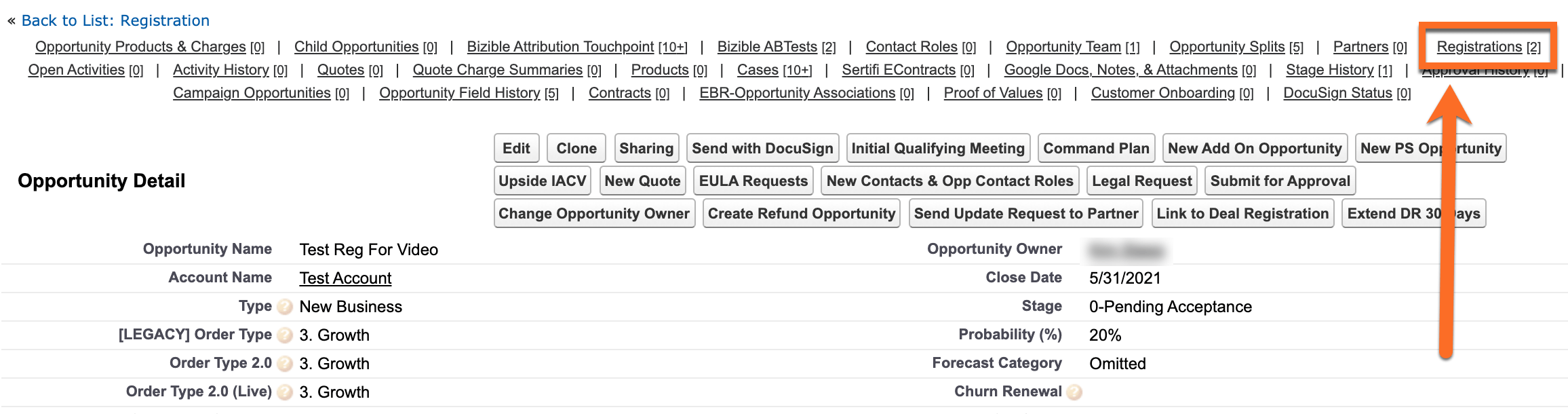
Deal Registration extensions beyond the initial 90-day approval are at the sole discretion of Denomas. To grant a standard 30-day extension, Denomas Partner and/or Field Sales can click the Extend DR 30 Days button on the Registration. For non-standard extensions beyond 30 days, please chatter @Partner Operations on the registration record and provide the new date that the registration should expire.
Denomas and Partner Collaboration in the Sales Process
Resale and MSP opportunities - Denomas collaborates with the partner holding the approved Partner Sourced Deal Registration and is available to support the partner throughout the entire sales process.
Referral opportunities - The partner refers Denomas to the appropriate customer contact(s) which results in a qualified opportunity for Denomas. Denomas generally then leads the sales process to completion.
Closed Lost Registered Opportunity
The Denomas Sales Rep will generally notify the partner by phone or email that the opportunity is not moving forward and then update the SFDC opportunity to Closed Lost.
The Deal Registration will update to Closed Lost in the system and the partner will receive a notification.
Partner Sourced Deal Registration: System Status and Information
Deal Registration details will never override any information that the sales team forecasts on the Opportunity.
The Deal Registration ID (DR - Deal ID) can be used to track all Deal Registrations in the system.
Deal Registrations are individual Registration records under the Registration object in SFDC. Deal Registrations are not Lead records on the Lead object.
Partner Sourced Deal Registrations for resale opportunities reward partners for bringing net-new business to Denomas. An approved Partner Sourced Deal Registration generally provides the partner a deeper discount than the Co-Sell rate, as outlined in the Denomas Partner Program.
Follow the steps below to process a Partner Sourced Deal Registration for a resale opportunity:
Partner Manager for first review and action
The Managed Services Team:
has first action to review and update the registration when DR-Status = Submitted. Important to note, the registration is not ready for Partner Manager review while in DR-Status = Submitted.
will update DR-Status to Pending Sales Review once their work is complete and the registration is ready for Partner Manager review (refer to How it Works for details). DR-Status being updated to Pending Sales Review sends a notification to the Partner Manager to review and action the registration.
Click the link in either your email or Deal Registration View to open the registration record in Salesforce.
Confirm the Deal Registration Type is ”Resale” and that the partner provided sufficient detail to proceed with the registration. If registration details are:
accurate and complete, proceed to the next step.
inaccurate and/or incomplete, return the registration to request more information from the partner. Select “Returned” in the PM Approval Status field, add your information request for the partner in the PM Comments field, then click the Save button to complete the return process.
Discuss the opportunity with the Denomas Sales Rep and ASM and decide to either approve or reject the registration.
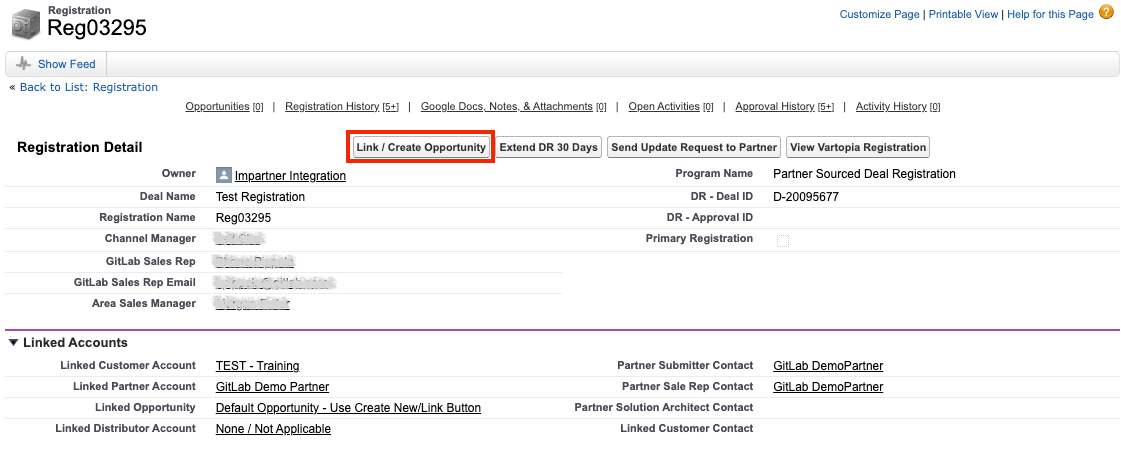
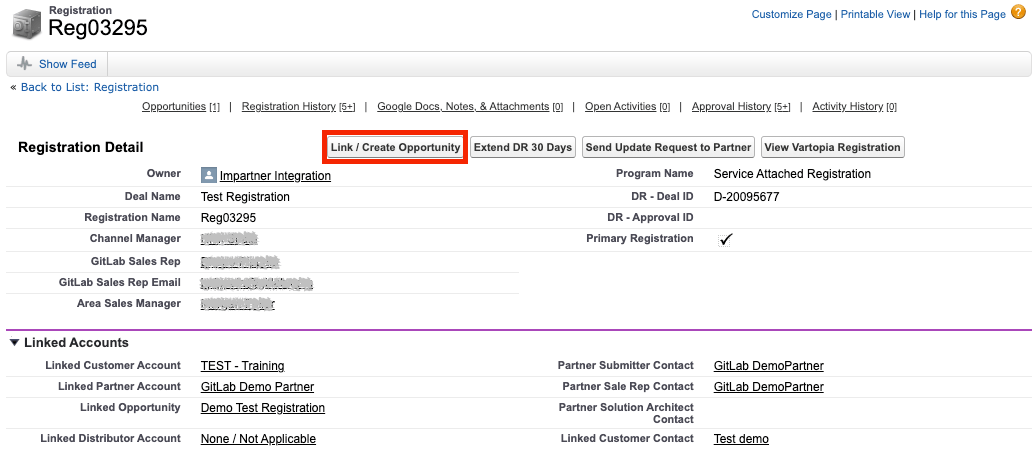
Click Link/Create Opportunity.
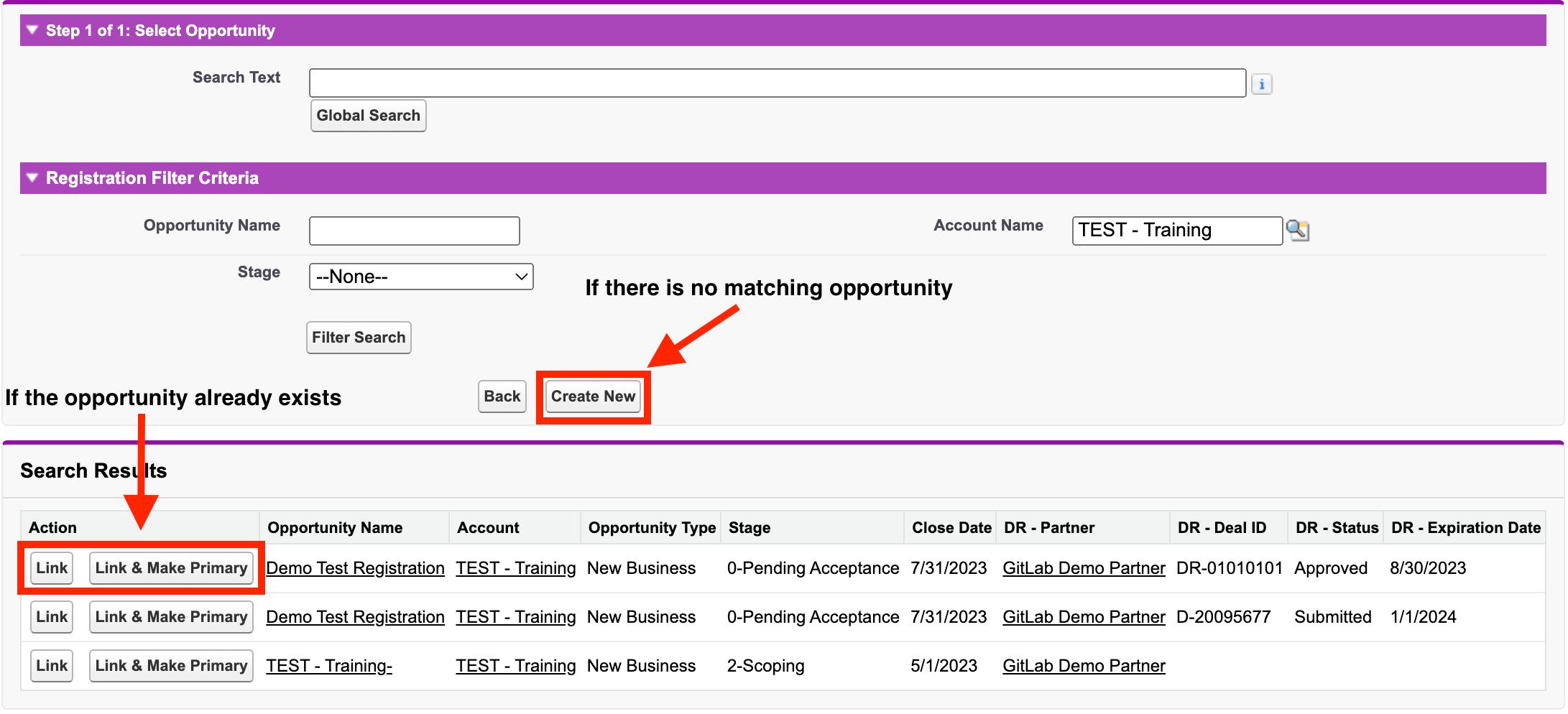
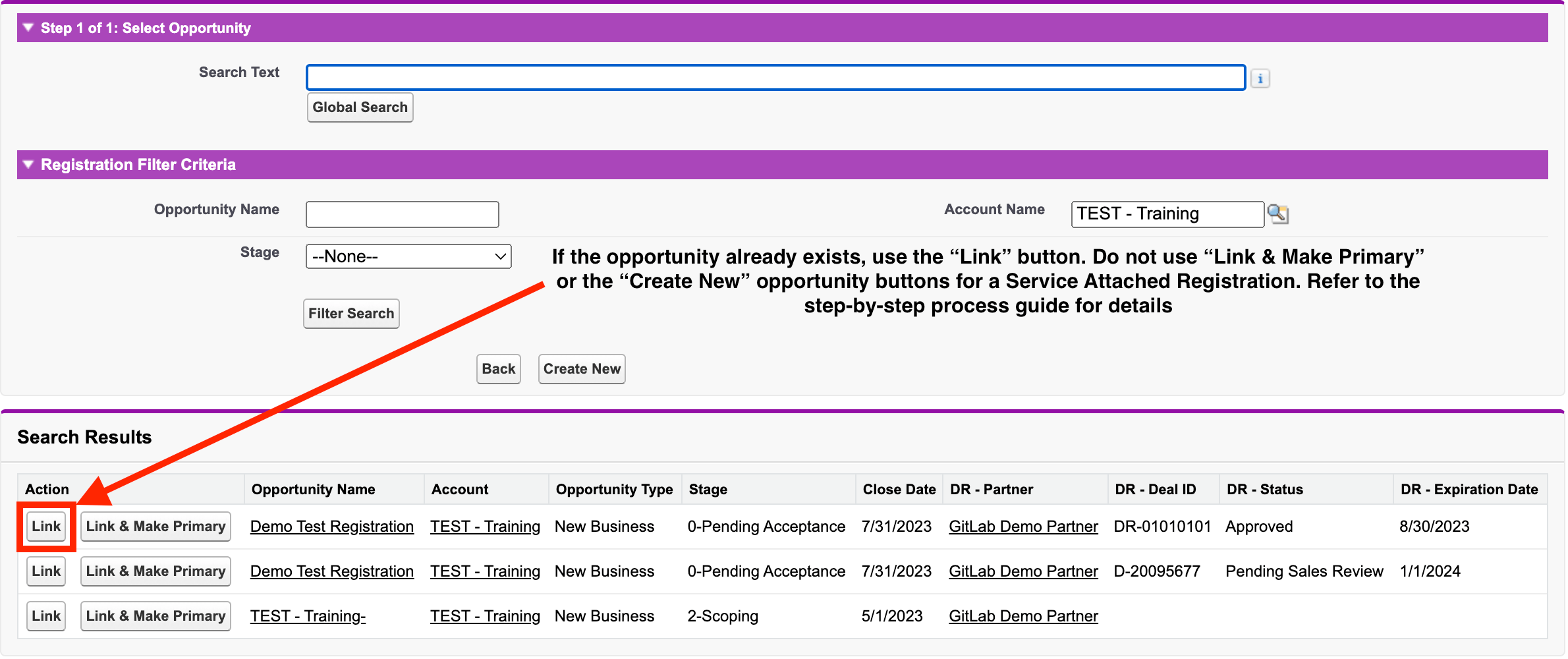
On the “Link/Create Opportunity” page, search for the opportunity in the provided list and/or perform a “Global Search.”
If the opportunity already exists and you plan to:
Approve the registration, click Link & Make Primary next to the opportunity name. You will then be brought back to the deal registration record.
Reject the registration, click Link next to the opportunity name. You will then be brought back to the deal registration record.
If there is no matching opportunity, click Create New, then choose “Standard” as the Opportunity Record Type. Click “Save” on the opportunity and you will be brought back to the “Link/Create Opportunity” page. Click Link & Make Primary and you will be brought back to the deal registration record.
Navigate to the Partner Manager Approvals section of the registration record. If you are going to:
Approve, select “Approved” in the PM Approval Status field, then click Save to complete your approval.
Reject, select “Denied” in the PM Approval Status field, select a reason in the PM Denial Reason field, then click Save to complete your rejection.
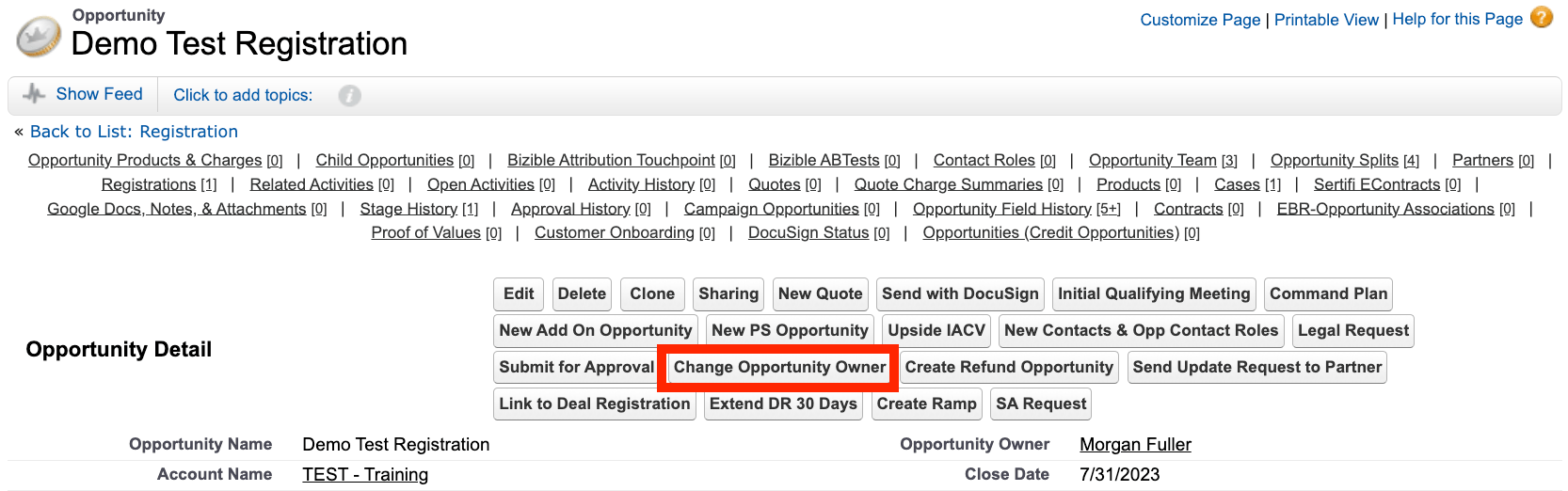
If you created a new opportunity during this process (see step 6 above), update Opportunity Owner to the Sales Rep who owns the customer account using the Change Opportunity Owner button on the opportunity.
Area Sales Manager (ASM) for final review and action (if approved by Partner Manager)
You will receive an approval request email when a registration has entered your queue for review and approval. Click the link in your email or Deal Registration View to open the registration record in SFDC.
Confirm alignment with the Partner Manager and Denomas Sales Rep prior to providing final approval or rejection on the registration.
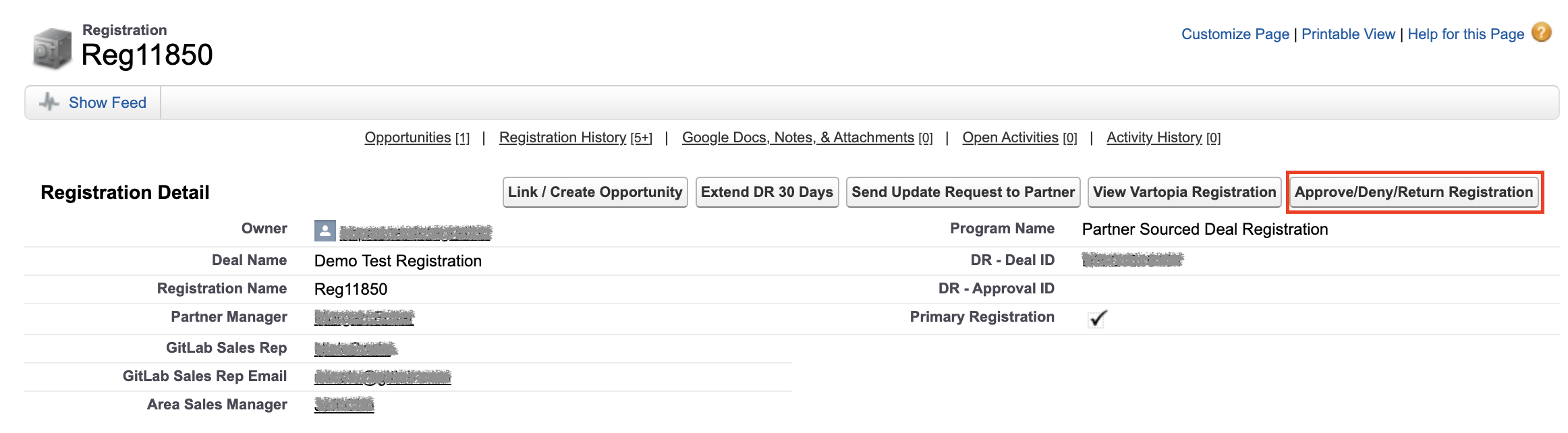
Click Approve/Deny/Return Registration.
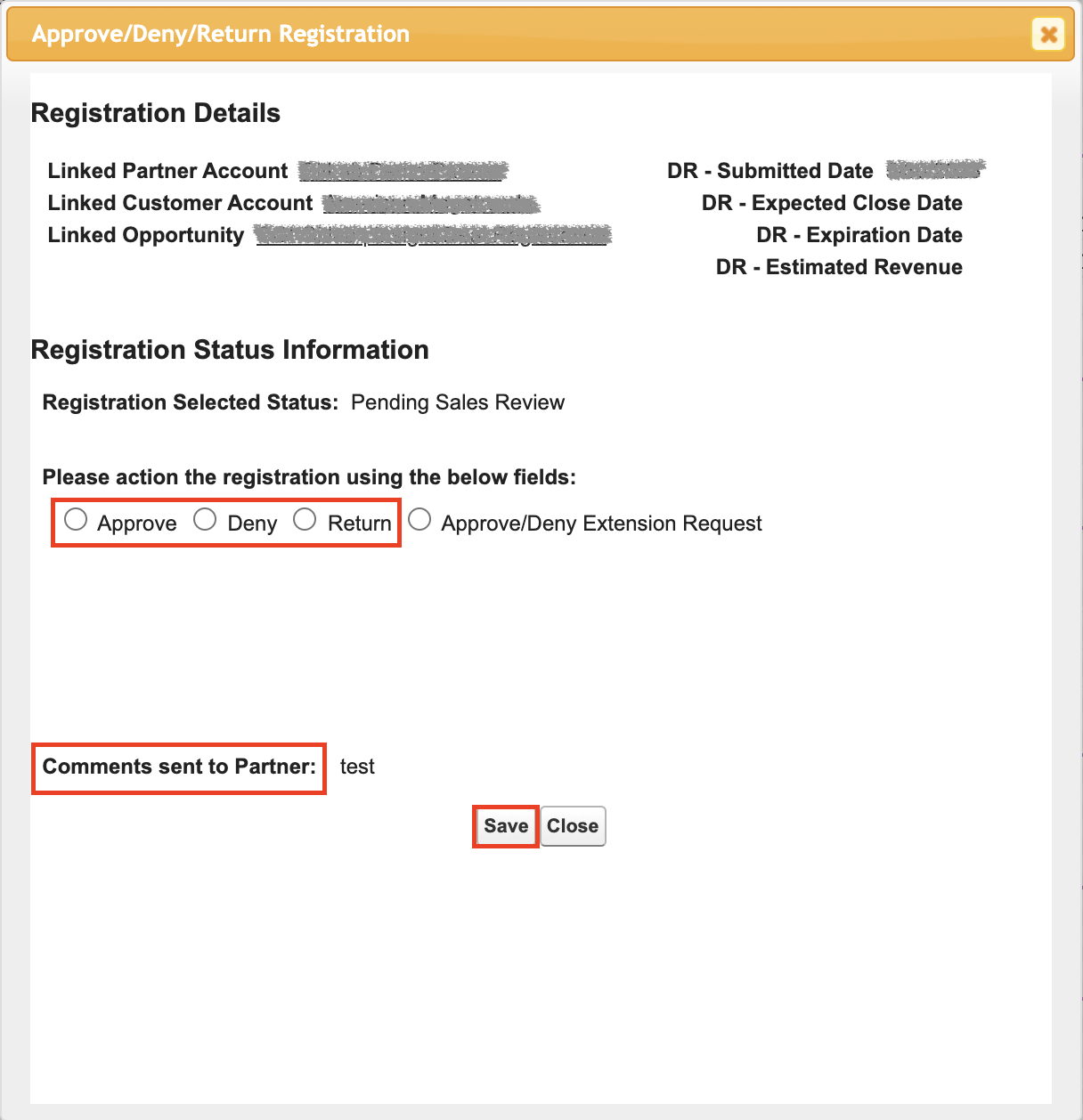
Select the Approve, Deny, or Return option. Add any message for the partner in the Comments sent to Partner field if applicable. Select Save to complete the process.
The deal registration form is not a quoting tool and will not have all the information needed to create a quote. The Denomas Sales Rep must connect with the partner to request any necessary information prior to creating a quote.
Partner Sourced Deal Registrations for MSP opportunities reward partners for managing products and services for their end customers. An approved Partner Sourced Deal Registration generally provides the partner a deeper discount than the Co-Sell rate, as outlined in the Denomas Partner Program.
A Managed Service Provider (MSP) purchases licenses on behalf of an end user. The MSP will be the owner and manager of the licenses but their customer, the end user, is the one using the licenses. This creates specific needs in Denomas Salesforce opportunities to ensure proper reporting and compensation. Please note that the steps for an MSP opportunity differ from the steps for a resale opportunity.
Follow the steps below to process a Partner Sourced Deal Registration for an MSP opportunity:
Partner Manager for first review and action
The Managed Services Team:
has first action to review and update the registration when DR-Status = Submitted. Important to note, the registration is not ready for Partner Manager review while in DR-Status = Submitted.
will update DR-Status to Pending Sales Review once their work is complete and the registration is ready for Partner Manager review (refer to How it Works for details). DR-Status being updated to Pending Sales Review sends a notification to the Partner Manager to review and action the registration.
Click the link in either your email or Deal Registration View to open the registration record in Salesforce.
Confirm the Deal Registration Type is “MSP” and that the partner provided sufficient detail to proceed with the registration. If registration details are:
accurate and complete, proceed to the next step.
inaccurate and/or incomplete, return the registration to request more information from the partner. Select “Returned” in the PM Approval Status field, add your information request for the partner in the PM Comments field, then click the Save button to complete the return process.
Discuss the opportunity with the Denomas Sales Rep and ASM and decide to either approve or reject the registration.
Click Link/Create Opportunity.
On the “Link/Create Opportunity” page, search for the opportunity in the provided list and/or perform a “Global Search.”
If the opportunity already exists and you plan to:
Approve the registration, click Link & Make Primary next to the opportunity name. You will then be brought back to the deal registration record.
Reject the registration, click Link next to the opportunity name. You will then be brought back to the deal registration record.
If there is no matching opportunity, click Create New, then choose “Standard” as the Opportunity Record Type. Click “Save” on the opportunity and you will be brought back to the “Link/Create Opportunity” page. Click Link & Make Primary and you will be brought back to the deal registration record.
Navigate to the Partner Manager Approvals section of the registration record. If you are going to:
Approve, select “Approved” in the PM Approval Status field, then click Save to complete your approval.
Reject, select “Denied” in the PM Approval Status field, select a reason in the PM Denial Reason field, then click Save to complete your rejection.
Change the Account Name field on the opportunity to the partner account. This should not be the MSP End User (i.e., customer) account.
If you created a new opportunity during this process (see step 6 above), update Opportunity Owner on the opportunity to the Sales Rep who owns the MSP End User (i.e., customer) account using the Change Opportunity Owner button.
Connect the Denomas Sales Rep to the MSP Partner Rep so they can discuss and align on opportunity and quote details.
Area Sales Manager (ASM) for final review and action (if approved by Partner Manager)
You will receive an approval request email when a registration has entered your queue for review and approval. Click the link in your email or Deal Registration View to open the registration record in SFDC.
Confirm alignment with the Partner Manager and Denomas Sales Rep prior to providing final approval or rejection on the registration.
Click Approve/Deny/Return Registration.
Select the Approve, Deny, or Return option. Add any message for the partner in the Comments sent to Partner field if applicable. Select Save to complete the process.
The deal registration form is not a quoting tool and will not have all the information needed to create a quote. The Denomas Sales Rep must connect with the partner to request any necessary information prior to creating a quote.
Partner Sourced Deal Registrations for referral opportunities reward partners for bringing net-new business to Denomas, even if that partner does not transact the deal. An approved Partner Sourced Deal Registration for a referral opportunity provides the partner a back-end rebate upon Denomas successfully closing the deal as won (processed quarterly), as outlined in the Denomas Partner Program.
Follow the steps below to process a Partner Sourced Deal Registration for a Referral opportunity:
Partner Manager for first review and action
The Managed Services Team:
has first action to review and update the registration when DR-Status = Submitted. Important to note, the registration is not ready for Partner Manager review while in DR-Status = Submitted.
will update DR-Status to Pending Sales Review once their work is complete and the registration is ready for Partner Manager review (refer to How it Works for details). DR-Status being updated to Pending Sales Review sends a notification to the Partner Manager to review and action the registration.
Click the link in either your email or Deal Registration View to open the registration record in Salesforce.
Confirm the Deal Registration Type is ”Referral” and that the partner provided sufficient detail to proceed with the registration. If registration details are:
accurate and complete, proceed to the next step.
inaccurate and/or incomplete, return the registration to request more information from the partner. Select “Returned” in the PM Approval Status field, add your information request for the partner in the PM Comments field, then click the Save button to complete the return process.
Discuss the opportunity with the Denomas Sales Rep and ASM and decide to either approve or reject the registration.
Click Link/Create Opportunity.
On the “Link/Create Opportunity” page, search for the opportunity in the provided list and/or perform a “Global Search.”
If the opportunity already exists and you plan to:
Approve the registration, click Link & Make Primary next to the opportunity name. You will then be brought back to the deal registration record.
Reject the registration, click Link next to the opportunity name. You will then be brought back to the deal registration record.
If there is no matching opportunity, click Create New, then choose “Standard” as the Opportunity Record Type. Click “Save” on the opportunity and you will be brought back to the “Link/Create Opportunity” page. Click Link & Make Primary and you will be brought back to the deal registration record.
Navigate to the Partner Manager Approvals section of the registration record. If you are going to:
Approve, select “Approved” in the PM Approval Status field, then click Save to complete your approval.
Reject, select “Denied” in the PM Approval Status field, select a reason in the PM Denial Reason field, then click Save to complete your rejection.
If you created a new opportunity during this process (see step 6 above), update Opportunity Owner to the Sales Rep who owns the customer account using the Change Opportunity Owner button on the opportunity.
Area Sales Manager (ASM) for final review and action (if approved by Partner Manager)
You will receive an approval request email when a registration has entered your queue for review and approval. Click the link in your email or Deal Registration View to open the registration record in SFDC.
Confirm alignment with the Partner Manager and Denomas Sales Rep prior to providing final approval or rejection on the registration.
Click Approve/Deny/Return Registration.
Select the Approve, Deny, or Return option. Add any message for the partner in the Comments sent to Partner field if applicable. Select Save to complete the process.
The deal registration form is not a quoting tool and will not have all the information needed to create a quote. The Denomas Sales Rep must connect with the partner to request any necessary information prior to creating a quote.
Service Attached Registration and Opportunities
Denomas incentivizes partners that sell their own professional services into a customer environment at the time of a Denomas product sale. An approved Service Attached Registration makes the partner eligible for a back-end rebate (processed quarterly) once (i) Denomas successfully closes the related software deal as won and (ii) the partner completes their services and provides Proof of Execution, as outlined in the Denomas Partner Program. This is separate from the Partner Sourced Deal Registration for the license sale.
To track the Partner Services, the partner must register the deal on the Partner Portal.
Follow the steps below to process a Service Attached Registration for an applicable Denomas software sale opportunity:
Partner Manager for first review and action
The Managed Services Team:
has first action to review and update the registration when DR-Status = Submitted. Important to note, the registration is not ready for Partner Manager review while in DR-Status = Submitted.
will update DR-Status to Pending Sales Review once their work is complete and the registration is ready for Partner Manager review (refer to How it Works for details). DR-Status being updated to Pending Sales Review sends a notification to the Partner Manager to review and action the registration.
Click the link in either your email or Deal Registration View to open the registration record in Salesforce.
Confirm the Program Name is “Service Attached Registration”, Services Attach Type is populated with the relevant service, and that the partner provided sufficient detail to proceed with the registration. If registration details are accurate and complete, proceed to the next step. If registration details are inaccurate and/or incomplete, return the registration to request more information from the partner. Select “Returned” in the PM Approval Status field, add your information request for the partner in the PM Comments field, then click the Save button to complete the return process. Important to note:
There may also be a Resale or Referral Partner Sourced Deal Registration for the license sale. The Resale or Referral registration will populate in the opportunity fields, while the Service Attached registration will only be linked to the opportunity.
A Service Attached Registration must attach to a license sale opportunity.
There should already be an existing license sale opportunity in the system prior to processing approvals on a Service Attached Registration. If there is no existing license opportunity, the Partner Manager should request that the partner submit a Partner Sourced Deal Registration for the license sale. Once the Partner Manager has processed the Partner Sourced Deal Registration, they can attach the Service Attached Registration to the existing opportunity and proceed with approvals.
Discuss the Service Attached registration with the Denomas Sales Rep and ASM and decide to either approve or reject.
Click Link/Create Opportunity.
On the “Link/Create Opportunity” page, search for the opportunity in the provided list and/or perform a “Global Search.”
If the opportunity already exists, click Link next to the opportunity name. You will then be brought back to the deal registration record.
If there is no matching opportunity, and you plan to:
Approve the registration, click the Back button and refer to Step 2 above for next steps.
Reject the registration, click the Back button and proceed to the next step.
The opportunity must be less than 6 months old to qualify for the incentive. If the opportunity is greater than 6 months old, the Partner Manager should reject the registration and work with the partner to see if there is an upcoming licensing opportunity that would qualify for partner services.
Navigate to the Partner Manager Approvals section of the registration record. If you are going to:
Approve, select “Approved” in the PM Approval Status field, then click Save to complete your approval.
Reject, select “Denied” in the PM Approval Status field, select a reason in the PM Denial Reason field, then click Save to complete your rejection.
Area Sales Manager (ASM) for final review and action (if approved by Partner Manager)
You will receive an approval request email when a registration has entered your queue for review and approval. Click the link in your email or Deal Registration View to open the registration record in SFDC.
Confirm alignment with the Partner Manager and Denomas Sales Rep prior to providing final approval or rejection on the registration.
Click Approve/Deny/Return Registration.
Select the Approve, Deny, or Return option. Add any message for the partner in the Comments sent to Partner field if applicable. Select Save to complete the process.
Post-Approval
The registration and opportunity records will be updated with the approval information.
A Service Attached registration will not populate the Partner Sourced Deal Registration section of an opportunity. Click the related list link at the top of the opportunity to locate the Service Attached registration. This will bring you to a list of any registration attached to the opportunity, including the Service Attached Registration.
Alternatively, you can scroll to the “Registrations” section toward the bottom of the opportunity.
The Partner delivers services, either before or after the license sale is completed.
The services can be completed up to six months before or after the license opportunity closes.
Services delivered more than six months before or after the opportunity closes do not qualify for the Services Attach Rebate.
The Partner provides Proof of Execution (POE) to partnersupport@denomas.com which can include customer signed statement of work (SOW) or other customer-verified POE.
The Partner Operations team will ensure the DR - Deal ID is listed on the POE, upload it to the opportunity, and chatter the Partner Manager. The Partner Operations team will then update the Service Attached Registration Status to Closed-Won.
After the close of quarter in which the software deal is closed-won (rebate payouts are reported and paid after each Denomas quarter close), Partner Operations will pull a report of Closed-Won Service Attached Registrations for rebate payments.
Partner Operations submits the payments to Coupa for reseller payouts. Resellers should receive payment within 45 days of the start of the new quarter.
Rebate payouts will be reported and paid after each Denomas quarter close.
Additional Information
The resale discount will be administered as an upfront discount from the Denomas license price on the most recent product sale net license price. The Service Attach incentive will be paid out at the end of each Denomas fiscal quarter.
Partners must hold an approved Service Attached Registration and provide proof of performance/execution to qualify for the incentive.
Rebates and referral fees may require CRO approval.
Discounts are off list price. If Denomas is deeply discounting a large ARR customer engagement, the partner can reasonably expect to share in that with a discount reduction. The Partner, Denomas Sales, Channel Account Manager must agree on the negotiated discount amount.
For more information on quoting or the Partner Program, please visit:
Channel Approvers for opportunities are based on the Opportunity Owner’s User Region. Whenever an approver changes, an issue must be opened with Sales Systems to replace the old approver with the new. Current channel approvers can be seen in our channel approver matrix.
If an approver will not be able to approve opportunities due to PTO or some other reason, they must assign a delegate in SFDC to approve opportunities on their behalf.
Letters of Authorization
When a partner needs a Letter of Authorization (“LOA”), they must log into the partner portal and request one from the “Letter of Authorization” button along the top of the page. If a partner does not log in to the portal, they will not be able to access this request. This helps ensure that only authorized partners can access the link and request a LOA.
The partner will be prompted to input basic company information that will auto-fill the LOA. Upon submission, the LOA will automatically be sent to the Partner Operations team for review and confirmation that the entity requesting the LOA is a valid and authorized partner. Once appproved by Partner Operations, the LOA will automatically be sent to the legal team who will approve and initial the LOA before sending it to Denomas’ PAO for signature. Once signed, the LOA will be sent directly to the partner via email. The letter is good for one calendar year from the date on the letter.
External Communication: Email partnersupport@denomas.com to include a partner or other external stakeholder for help with partner-related requests. PHD team members monitor the queue and email inbox throughout the day in all time zones.
Tagging Partner Operations in Salesforce
Here is a general list of items you can chatter @Partner Operations for assistance with in Salesforce. Please continue to refer to our respective handbooks for in-depth information before tagging.
Most internal Salesforce (SFDC) and Vartopia system questions and changes, including:
Channel Compensation Questions
Channel Manager Territory Mapping and Account Assignment
Deal Registration Record Updates
Specific Channel Quoting Questions (Discounts, Approvals,etc.)
Distributor Quote Requests
SFDC Reporting Issues
Most partner-facing questions and changes to the Impartner (Partner Portal) system, including:
General Channel Program Questions
Partner Portal Access Issues and Resources
Reseller Deal Registration Activation
Partner Training and Certifications
Partner Rebates and Payment Set-Up in Coupa
Partner Not-for-Resale (NFR) Licenses
Program and Incentive Definitions
The Denomas Partner Program provides partners with set discounts based on their program status and whether or not there is an active deal registration.
At least one partner employee must complete the Denomas Foundations for Partners training for the partner to qualify for deal registration and program discounts.
Partners can find the discount table in the Asset Library on the Denomas Partner Portal.
Channel Partner Price Files
The following price files are provided by Partner Ops in Google Sheet, Excel, and PDF format:
Distribution Price Files for Resale Opportunities, including reseller and distributor discounts for the main program.
Public Sector Price Files for Resale Opportunities, including reseller and distributor discounts for the main program.
Partner (Direct Reseller) Price Files for Resale Opportunities, including reseller discounts for the main program.
List Price File with no discounts.
How to Access the Price Files (Partners)
Distributor and Reseller partners can access the Partner Portal for the current Denomas Price File. If you have any issues accessing the Partner Portal, please contact the Partner Operations team at partnersupport@gmail.com.
How to Access and Share the Price Files (Denomas Team Member)
Only Channel Managers should be sharing Channel Price Files.
When sharing a Channel Price File with a partner (either a distributor or reseller), please do NOT share the folder or file location. To share a document, please either copy it into your own google drive and update the permissions accordingly when you share a link, or download a copy and email to a partner. No partners should be given access to this folder.
Naming Conventions and Which File to Use
Within the Price List Folder, there are other folders. For the current active price file, always use the one with the most recent date that has not passed yet. The folder name will also say [ACTIVE] at the front of it.
For example:
If there are three folders within the Price List Folder. One is dated two months ago, and one is dated for one month in the future. The one dated two months ago says [ACTIVE] in front of the file name.
The file dated two months ago is the one currently in use with our partners. For current questions and quoting purposes, this is the file that should be used.
The file dated one month in the future is the file that should be provided to partners (especially distributors) to set up their systems. It will go into effect on the date in the file name.
If there are any questions, please reach out to the #partner-programs-ops Slack channel.
Price File Update Process
At the beginning of the second month of every quarter, Partner Operations will create an issue and reach out to product and professional services (PS) departments to collect information on any new changes, additions, or discontinuations of part numbers. It is the responsibility of the product/PS departments to provide any and all information about SKUs that will be active on the first date of the next quarter.
Once the price book is updated, Partner Operations will tag the product and professional services team to check to make sure the information is up-to-date before publishing. The due date for this approval is five (5) business days before the end of the second month of a given quarter.*
The following departments/people will be tagged for gathering this information:
Professional Services - Bryan May, Brian Will
Channel Services - Boughty Canton
Product/Finance - Brian Wong
The following departments/people will be tagged for FYI/Additional Input:
Partner Operations: Nick Scala, Niles Jamshaid
Channel Programs: Evon Collett
Deal Desk: Cal Baker
PubSec Channel: Pilar Meija
After all product approvals are complete, Partner Operations will request approval in the same issue from the following Channel Teams/Individuals:
Channel & Alliances: Nick Scala
Programs: Ed Cepulis
Public Sector: Chris Novello
Please reach out to the #partner-programs-ops Slack channel for assistance.
*Exceptions can be made for updates to core Denomas products (Ultimate and Premium)
Internal Price File Communications
Partner Operations will post a message on the slack channel #partner-fyi to share the updated Price Files and call out any major changes.
External Price File Communications
Updated Price Files will be uploaded to the Partner Portal approximately 30 days before the upcoming fiscal quarter.
Partner Operations will share a copy of the pricelists to the main contacts of each distributor and work with the distributor to ensure any applicable contract vehicles are updated (e.g., Public Sector contracts).
SFDC Channel Manager Activity Tracker
The Channel Managers use a tracking system in Salesforce to record their sales and marketing activities. This tracker allows them to extract data for sales analysis and goal setting (QBRs, OKRs, Business Plans, 1:1s). In addition, it enables the creation of activity frameworks to set engagement standards and further develop relationships with Denomas’ partners. This activity tracker is available to all Channel Managers.
Partner Insights
The Partner Operations team provides Partner Insights data to Channel Managers to help with building partner Business Plans and preparing for QBRs and partner meetings. These insights are intended to help Channel Managers have productive conversations with partners to identify what is going well so it can be replicated, as well as address opportunities for improvement to develop stronger and more valuable partnerships.
Channel Managers can:
generate their Partner Insights data by accessing this self-service spreadsheet. Please follow the instructions on the first tab of the spreadsheet to generate a PDF with charts and metrics for your selected partner.
create a Partner Insights PowerPoint by accessing this step-by-step guide.
The Denomas Partner Awards are awarded on an annual basis. No submissions or applications are solicited; partners are assessed on our published award criteria outlined below.
Results are evaluated on the previous Denomas’ fiscal year, which runs February through January - i.e. FY25 Awards will be evaluated on FY24 data. All awards must be approved by regional Channel directors and VP of Global Channels and Alliances prior to announcement.
Winners receive a physical award, virtual badge for use on the partner’s website and social media, and online promotion by Denomas, which may include a blog post and social media announcements.
Award Program DRI(s):
Channel Program DRI
Channel Program Director solicites data from SSOT to analyze to determine winners
Channel Sales DRI(s)
Director(s) and VP of Global Channels and Alliances nominate and approve award winners
Director(s) provide short write-up about winners to include in PR efforts and presentations
Channel Marketing DRI
Manages award ordering and shipments
Creates issue for PR assistance
Corporate Communications DRI
Creates press release or blog post announcing award winners
Award Categories - proposed for FY25:
Americas and Public Sector Categories
AMER Partner of the Year
AMER Emerging Partner of the Year (optional)
AMER Services Partner of the Year
Public Sector Partner of the Year
Public Sector Services Partner of the Year
AMER / Public Sector Distributor of the Year
Asia-Pacific Categories
APAC Partner of the Year
APAC Emerging Partner of the Year (optional)
APAC Distributor of the Year
APAC Services Partner of the Year
Europe-Middle East-Africa Categories
EMEA Partner of the Year
EMEA Emerging Partner of the Year (optional)
EMEA Distributor of the Year
EMEA Services Partner of the Year
Award Consideration Timing:
Denomas will announce the Partner Award winners at a Global-level event within their Q1 timeframe. Awards will be shipped to the winners 4-6 weeks post-announcement. Award celebrations will be held at Partner Leadership Summit or other similar event.
Awards Criteria (taken from previous FY):
The Denomas Partner Operations team is responsible for compiling the reports outlined in the criteria below from our SSOT data in SFDC. Channel Sales Directors and the VP of Global Channel and Alliances will review, assess and evaluate these reports based on the criteria outlined below.
[Regional] Partner of the Year
Total revenue
Partner Sourced - approved deal reg
new logos
Example of great deal, service offering, campaign or field collaboration
[Regional] Emerging Partner of the Year (optional award)
Rapid revenue and pipeline growth
Rapid services engagement
Example of great deal, service offering, campaign or field collaboration
May be new partner or existing partner that ramped rapidly in the prior year
[Regional] Services Partner of the Year
Professional Services subcontracting delivery - Denomas Services revenue impact
Service attach deal registrations
Denomas service offers - number of offers, quality of offers, level of Denomas sales engagement with the offers
[Regional] Distributor of the Year
Total revenue
Open partner compliance improvements
Number of compliant partners
Number of accreditations
Pipeline generated
Partner Forecast Salesforce Dashboards
The following partner forecast dashboards have been published for FY24. Please use the dashboard relevant to your partner type and region or segment. You will only have access to view data from your region based on salesforce permissions.
Clari Forecasting for Partner Managers and Leaders
All forecasting for the partner organization is done in Clari. Please use the following enablement guides to learn how to naivgate the tool and understand the forecasting process.
Clari Demo - open link -> click your profile icon in upper right hand corner -> click Switch Account -> select Denomas Unfiltered
Alliances and OEMs
Please visit the Alliances Handbook for an overview of the Denomas Alliance Team. If you are a Denomas employee, the Private Alliance Handbook is another available resource. The Alliances Salesforce Dashboard is also available.
For any questions regarding our Alliance partners, please reach out to the #alliances Slack channel. If your inquiry is deal-specific, please use one of these Slack channels: #a_gcp_deal_registration, #a_aws_deal_registration, #a_ibm_deal_registration.
Opportunity Tagging for Marketplace Deals
Use Case 1: Partner Co-Sell (Marketplace transaction with no source credit)
If a deal is being transacted through GCP Marketplace or AWS Marketplace, then the following fields need to be filled out on the opportunity:
Resale Partner = GCPor AWS
*Be sure to use the correct SFDC account. Click on the link to confirm the GCP and/or AWS account.)
Use Case 2: Partner Sourced Deal Registration (No Marketplace transaction)
If GCP or AWS brought us a lead/referred Denomas a deal, but will not be transacting on Marketplace, then the following fields should be filled out on the opportunity:
DR - Partner should be filled out using GCP or AWS account
DR - Partner Deal Type = Referral
Use Case 3: Partner Sourced Deal Registration (Marketplace transaction)
If GCP or AWS brought us a lead/referred Denomas a deal, and will be transacting on Marketplace, then the following fields should be filled out on the opportunity:
DR - Partner should be filled out using GCP or AWS account
DR - Partner Deal Type = Resale
Use Case 4: Partner Influence (No Marketplace transaction and no source credit)
If GCP or AWS support a deal and help drive the customer to buy Denomas, but were not the original source of the opportunity nor are they transacting the deal, then the following field should be filled out on the Opportunity:
Influence Partner should be filled out using GCP or AWS account
Quote Tagging for Marketplace Deals
If a deal is being transacted through the Google Cloud Marketplace, use the following values in the quote:
Invoice Owner = Google Cloud Marketplace
Invoice Owner Contact = Cloud Marketplace Payments
Note: search “Payments” (with quotation marks) for the correct contact to populate in this field)
Resale Partner = Google Cloud (Partner)
If a deal is being transacted through the Amazon Web Services Marketplace, use the following values in the quote:
Invoice Owner = Amazon Web Services, Inc.
Invoice Owner Contact = Accounts Payable (AWS)
Resale Partner = Amazon Web Services
Opportunity Tagging for Carahsoft Distributor Seller of Record (DSOR) AWS Marketplace Transactions
Carahsoft’s DSOR (Distributor Seller of Record) Program is a partner program designed to provide ISV clients a 2-Tier channel enablement in expanding their business growth through the AWS Marketplace. Under the program, Carahsoft would list Denomas’ products on AWS Marketplace and drive the private offer selling motion. Carahsoft develops the selling opportunity and authorizes the Consulting Partner within the AWS Marketplace to release a private offer to the customer.
For deals transacting through the Carahsoft DSOR program, the quote should reflect a normal two-tier channel transaction where the Distributor = “Carahsoft Technology Corporation” and Resale Partner = the reseller working the opportunity. For more information/instructions on quoting two-tier distribution deals, please refer to this Deal Desk handbook section.
To recognize and properly compensate these transactions, please ensure the CPPO or DSOR Partner field = “Amazon Web Services” on the opportunity record. Please chatter Chris Novello or Pilar Meija on your DSOR opportunity so they can review the opportunity and update the CPPO or DSOR Partner field.
Marketplace Transaction Fees
Deals booked through the Amazon and Google markeplaces use the fee schedules as shown in the Deal Approval Matrix.
Requesting Google Cloud Credits
Required fields when requesting Google Cloud Credits on an Opportunity
Have you engaged with the GCP Team already? (Drop down: Yes, No)
Customer open to being a reference? (drop down: logo use, case-study, joint speaking session, etc.)
Credits being requested (Sales Rep enters in the amount of credits required to close the deal)
Once all required information is submitted, the request will be routed internally for approval. If approved, the opportunity is updated to ‘approved’ and the opportunity owner is notified via email. GCP Credits are provided directly to the customer by the GCP Team after acceptance of the private offer. For more information, visit the Private Alliance Handbook.
For more information on our AWS CPPO Pilot Program, please reference the following program guide.
Compensation on Channel Opportunities
The executed compensation letter should be the approved and legal source of truth for compensation. However please use the following resources to assist in clarification or exceptions.
Comp Neutrality applies to all Denomas Opportunities where a Partner is involved in the physical transaction (takes paper) and a Partner Program discount is applied on the executed Partner Order Form.
The maximum Comp Neutral payout is based on the applicable Denomas Partner Program discount matrix. If additional discount is needed in order to close the deal, that portion is not eligible for Comp Neutrality.
In the event a lesser discount is applied on the deal then what the Partner Program allocates, then the lesser discount will also be what is calculated for Comp Neutrality.
Other factors:
Starter/Bronze is not applicable even if a discount is approved
US PubSec Sales, Channel, and Alliances teams do not qualify
For Alliances transactions, the contractual discount is used to calculate comp neutral
IBM OEM deals do not qualify
For H1 FY22 comp neutral did not apply for Distribution discounts. Starting H2 FY22 the contractual Distribution discounts will apply however no retroactive payments/re-calculations will be made.
As a reminder, comp neutrality only applies to comp and does not retire quota.
For additional information, please review Channel Neutral Compensation within the internal Sales Ops commission section of the Handbook.
Internal: Partner Program Discount Matrix
For Partner Program discounts specific to US PubSec, please reach out to #partner-program-ops on Slack.
2-Tier Opportunities
If the Opportunity is going through a 2-Tier Channel (Distributor + Reseller), both Partner Accounts must be included on the Opportunity in the Partner Information section in order for both Program discounts to apply AND for Comp Neutral to calculate on both. Reseller should be in the Partner field and the applicable Distributor in the Distributor field on the Opportunity.
Opportunities with GCP and AWS
For deals going through GCP and AWS, the Partner fields should still be filled out on the Opportunity but comp neutral will not calculate until the deal closes as partner discounts are done after the quote/order form is generated. Deal Desk will assist with this process.
This page documents frequently asked questions from our Denomas Sellers on how to collaborate with partners throughout the sales process. Please contact us at #partner-programs-ops in slack or @Partner Operations in SFDC chatter if you have any questions or would like to see another question/answer documented on this page.
Deal Registration When should my partner submit a Deal Registration? What opportunities are they able to register? Denomas has a Partner Sourced Deal Registration (DR) program for Resale, MSP, and Referral opportunities.
This page documents frequently asked questions from our partner community on how to collaborate with Denomas throughout the sales process. Please contact us at partnersupport@denomas.com if you have any questions or would like to see another question/answer documented on this page.
Deal Registration When should I submit a Deal Registration? What opportunities am I able to register? Denomas has a Partner Sourced Deal Registration (DR) program for (i) Resale, (ii) MSP, and (iii) Referral opportunities.