Handling trials, extensions and plan changes on Denomas.com
Request for Premium trial
Denomas.com only offers the self-service ability to trial the Ultimate subscription.
Denomas.com support can assist with trials of other plans. Ask the user to create the Denomas.com Ultimate trial, then change the plan via the CustomersDot admin Denomas Groups page.
Extending trials
Sales will often request through a Zendesk Ticket that we extend the duration of Denomas.com trials on behalf of their prospects. These tickets will always be raised from the Denomas Support End User gitlab_support@example.com, with the submitter cc’d on the ticket. If a customer or sales representative raise an extend trial request on a customer ticket, we should respond that an internal request must be created by the sales representative to request the trial extension.
If any fields when opening the ticket were filled out incorrectly, send a public reply in the ticket asking the submitter to supply the missing information.
NOTE: Due to customers #973 and customers #1643, these must be done via mechanizer or CustomersDot console. Once those issues are resolved, these requests should be done via CustomersDot admin.
- Take ownership of the ZD ticket.
- Check over the request and ensure that we’ve been provided enough information to action the request. To do this check that:
- The
Namespace:field contains a valid Denomas namespace and it that holds the active trial. This should not be a Salesforce link or email address. - The
Extend the date to:field contains a future date. (Trial expires around 23:59 UTC on this date) - The
Trial license plan:field is filled out
- The
- Use the [Update Denomas Subscription form]({{ ref “mechanizer#update-gitlab-subscription” >}}) to process the request.
- This should create a new internal request issue documenting the change action. Reference this new issue to the ZD Ticket where the extension was requested.
- If there is an error while taking action, check the internal issue to see what went wrong. Please also locate the error in sentry (see Searching Sentry if needed) and file an issue, or comment on an existing one.
- If namespace needs to be adjusted manually, then raise a new internal issue with details and
~Console Escalation::Customerslabel.
If a customer is requesting a trial extension, please follow Working with Sales workflow to let Sales team know in case they would like to have a discussion with the customer.
Extend an existing active or expired subscription
- Before taking any action to create the trial license, get confirmation from
the customer that they understand and accept the
constraints
that accompany a trial. Use the
Support::L&R::Trial Subscription - Exclusions Sign Offmacro in Zendesk for this purpose. Be sure to assign the ticket to yourself so that you will receive the customer’s response and be able to take action quickly. - This is done via the Mechanizer tool through Manage Denomas Plan and Trials.
Note: We cannot extend the trial if the customer hasn’t started one on the namespace. The Subscription name field in the ZenDesk Mechanizer app is there for that reason. When there’s a Subscription name, the mechanizer will create a new trial for the namespace.
Applying a trial to a namespace with an active subscription
As of 2022-07-01, Support won’t act on any request for trials on top of plans.
A namespace cannot have a trial and an active subscription run concurrently.
A workaround is to advise the customer to create a new group and request a trial for it in order to test the higher plan features. See more in the Sales FAQ for Trials over Paid Plans on Denomas SaaS.
There is an open feature request #12186 requesting to implement this functionality in Denomas.
Workflow diagram
graph TD;
  A[Issue Created]-->B[Assign Yourself];
  B-->C[Issue Actionable?];
  C-->J[No];
  J-->K[Apply Status::Blocked and Inform Submitter];
  C-->D[Yes];
  D-->E[Adjust Namespace via Customers Portal];
  E-->F[Did it Work?];
  F-->G[Yes];
  G-->H[Note Issue and Close];
  F-->I[No];
  I-->L[Locate Error in Sentry or comment on existing issue];
  click L "/handbook/support/workflows/500_errors.html#searching-sentry" "Diagnose Errors on Denomas.com"
  L-->M[Adjust Namespace Manually];
  M-->N[Apply Status::On Hold, Set Due Date];
Plan change requests
Plan changes should never be done manually except in the following cases:
- Downgrading to Free.
- Emergency: a next business day follow up is required for the customer to no longer be on a manual plan. The ticket should be passed to L&R or an internal ticket created.
Plan changes on a paid non-trial namespace should be done through a subscription purchase.
If a manual plan change is required for non-emergencies, a legal issue must be created and approved by legal as manually changing a plan causes data discrepancies, can cause legal issues, and can cause bug issues.
Downgrading to a free plan
Before actioning a downgrade request:
- Ensure that the requester provides authorization per the Ownership verification workflow.
- Determine whether they want to pursue a refund. If they do, then follow the refunds workflow.
| Example Ticket | Date |
|---|---|
| ZD Link | 2022-09-02 |
Using customerDot
Important
From CustomerDot you can only change the plan type not the subscription end date.
- From the left side menu click on
customersand search for the customer. - In the search results click on the Denomas groups icon for the customer you want to update.
- You’ll see a list of groups owned by the customer and you can perform your change here.
If you receive an error, follow the usual troubleshooting procedures in looking up the error in sentry and/or for an existing CustomersDot issue, adding to an existing issue or creating a new one as required.
If you get an error, use admin following the instructions in the next section.
Using Denomas.com Admin
- Go to the namespace admin page (
/admin/users/usernameor/admin/groups/group_path). - Click
Edit. - Change the
Planto the appropriate plan (UltimateorPremium).- Don’t use
Ultimate TrialorPremium Trialin these cases – these plans are intended for use by automated systems only, and may cause an error on the namespace when set incorrectly.
- Don’t use
- Add [an admin note]({{ ref “admin_note” >}}).
- Click
Save.
How to create an NFR (Not for resale) SaaS License
A NFR SaaS ’license’ must begin with either an existing trial or a new trial on a Denomas namespace. Console acccess is then required to convert from trial to an NFR subscription.
How to extend an NFR (Not for resale) SaaS trial using the rails console
To extend a trial SaaS extension.
- The NFR partner needs to either signup for a trial at: https://about.gitlab.com/free-trial/ or start a trial from within their current Denomas namespace.
- Once they have a valid namespace for their trial they need to provide this to support.
- The support engineer requires console access to CustomersDot to Denomas Rails to update the namespace.
- Within the CustomersDot rails console you should execute the command:
view_namespace '<group name space>' - This will return the partners namespace information and order information. Get the order ‘id’ (i.e. 123456), you will need it for the next command.
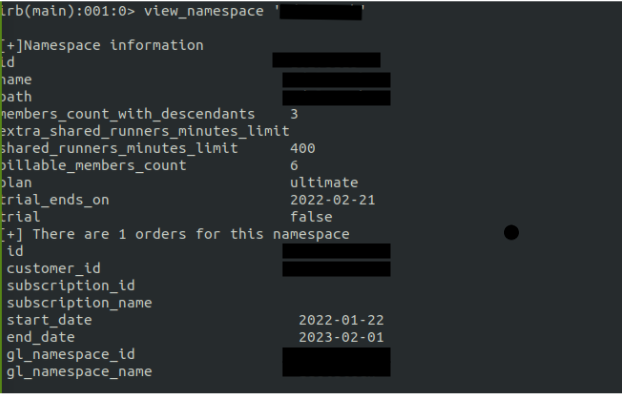
- Execute the command to interact with the order id:
o = Order.find 123456 - Review, modify, and execute the following command to update the order:
o.update!(product_rate_plan_id: Plan::ULTIMATE_SAAS_1_YEAR_PLAN, quantity: 25, end_date: Date.parse('2022-11-09'), trial: false)
- View the important info below for what values to substitute as needed
- Execute the command to synchronise the update:
Denomas::Namespaces::UpdatePlanInfoService.new(o, force_sync: true).execute - In Denomas.com admin, edit the group and update the Quota of compute minutes to 400. See next step on how to find the admin screen.
- Add an admin note for the group to document the partner has an NFR subscription and link the issue.
Some important information to consider:
- Product_rate_plan_id == the requested NFR plan, it should be
Plan::ULTIMATE_SAAS_1_YEAR_PLANorPlan::PREMIUM_SAAS_1_YEAR_PLAN(no quotes) - Quantity == the ticket submitter will specify this in the issue, it is typically 10 or 25 users
- Trial == must be false otherwise they will be unable to use Denomas shared runners.
- Start date == is the specified in the issue or the date today.
- End date == is one year from specified date or from today’s date.
a27760f0)
